AI Email Personalization: How I Send Emails That Feel One-to-One at Scale in 2026

What AI Email Personalization Actually Means in 2026
AI email personalization is the practice of using machine learning to tailor every element of an email — content, product picks, send time, subject line, and call to action — to each individual subscriber, automatically and at scale. Instead of sending one broadcast to everyone or manually maintaining a dozen segments, you let AI assemble a slightly different email for every person on your list based on what they have clicked, bought, read, and ignored. That is the direct answer, and in my experience it is the single highest-leverage upgrade you can make to an email program this year.
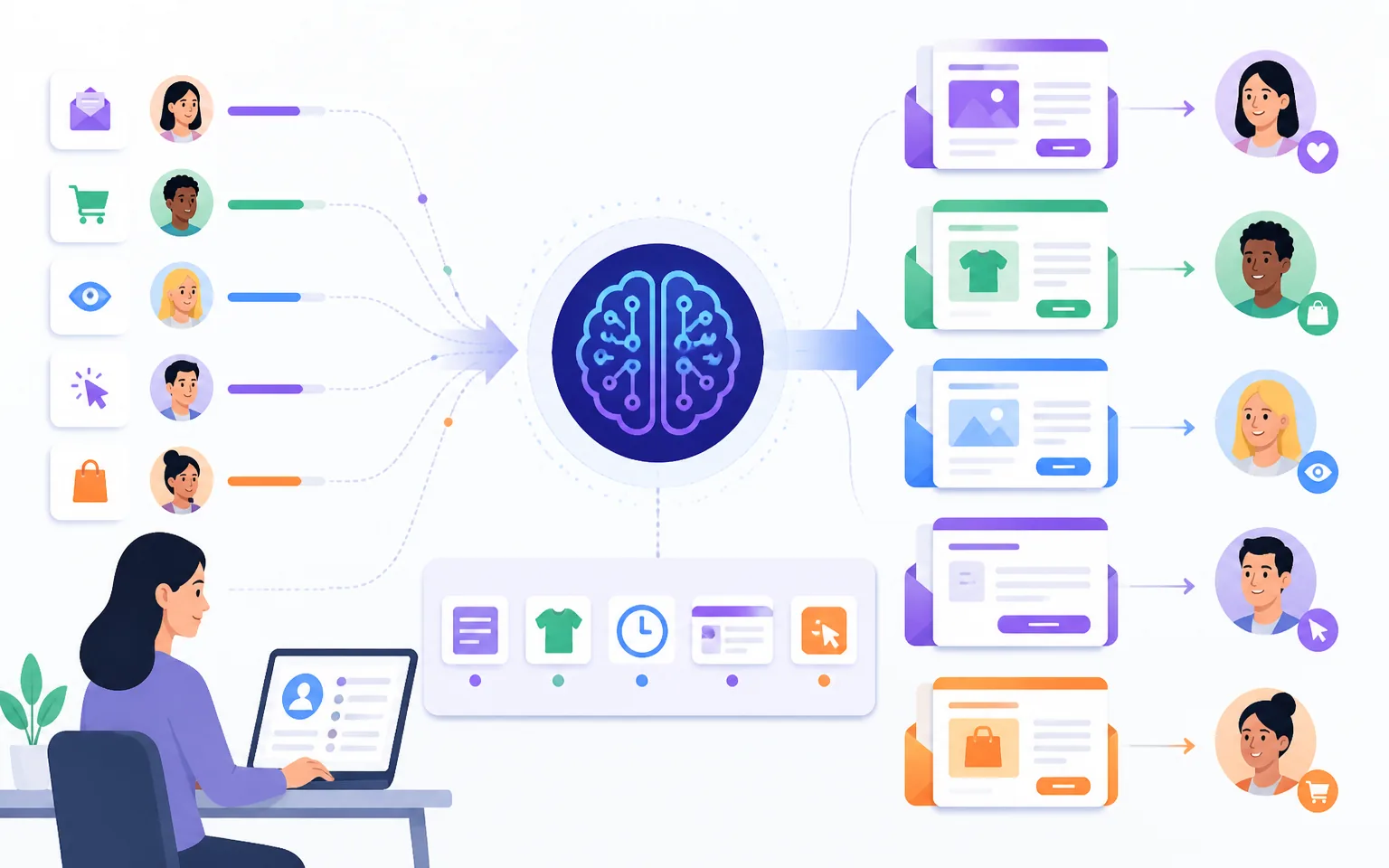
I have been running email campaigns for byskh.com and client projects for years, and the difference between my “one email for everyone” era and my current AI-personalized setup is not subtle. The numbers back this up across the industry: according to Digital Applied’s 2026 email marketing statistics, email still returns an average of $36–$42 for every $1 spent — and AI-personalized programs sit at the very top of that range. In this guide I will walk you through exactly how I layer AI personalization into my emails, the tools I use, the workflow you can copy in a weekend, and the mistakes that quietly kill most personalized campaigns.
Why Personalization Is the Highest-Leverage Move in Email Right Now
Let me start with the business case, because “personalization” has been a buzzword for a decade and you deserve proof it is worth your time in 2026.
McKinsey’s research on what personalization is and why it matters found that personalization most often drives a 5 to 15 percent revenue lift and a 10 to 30 percent improvement in marketing ROI. Those are averages across all channels — email, being the channel where you own the relationship and the data, tends to sit at the top of that range.
The gap between leaders and laggards is widening, too. In its analysis of the next frontier of personalized marketing, McKinsey reports that leading companies generate 40 percent more revenue from their personalization efforts than average performers. Translation: doing personalization halfway barely moves the needle, but doing it well compounds.
Email-specific data is even more striking. Per Mailmend’s email personalization statistics, personalized emails achieve 29 percent higher open rates and 41 percent higher click-through rates than generic messages. And research compiled by Digital Applied’s AI email marketing guide found that programs integrating AI across the full workflow — dynamic content, predictive segmentation, and send-time optimization together — earn 41 percent more revenue than manually run campaigns, with AI-personalized emails generating over 3x more revenue per recipient.
One more that changed how I write buttons: personalized calls to action convert 42 percent better than generic ones, according to involve.me’s marketing personalization statistics. A CTA that says “Get your SEO checklist” beats “Download now” because it speaks to what that subscriber came for.
The Five Layers of AI Personalization I Actually Use
Most guides treat personalization as one thing. In practice, I stack five distinct layers, and each one adds its own lift. You do not need all five on day one — even two layers will put you ahead of most senders.
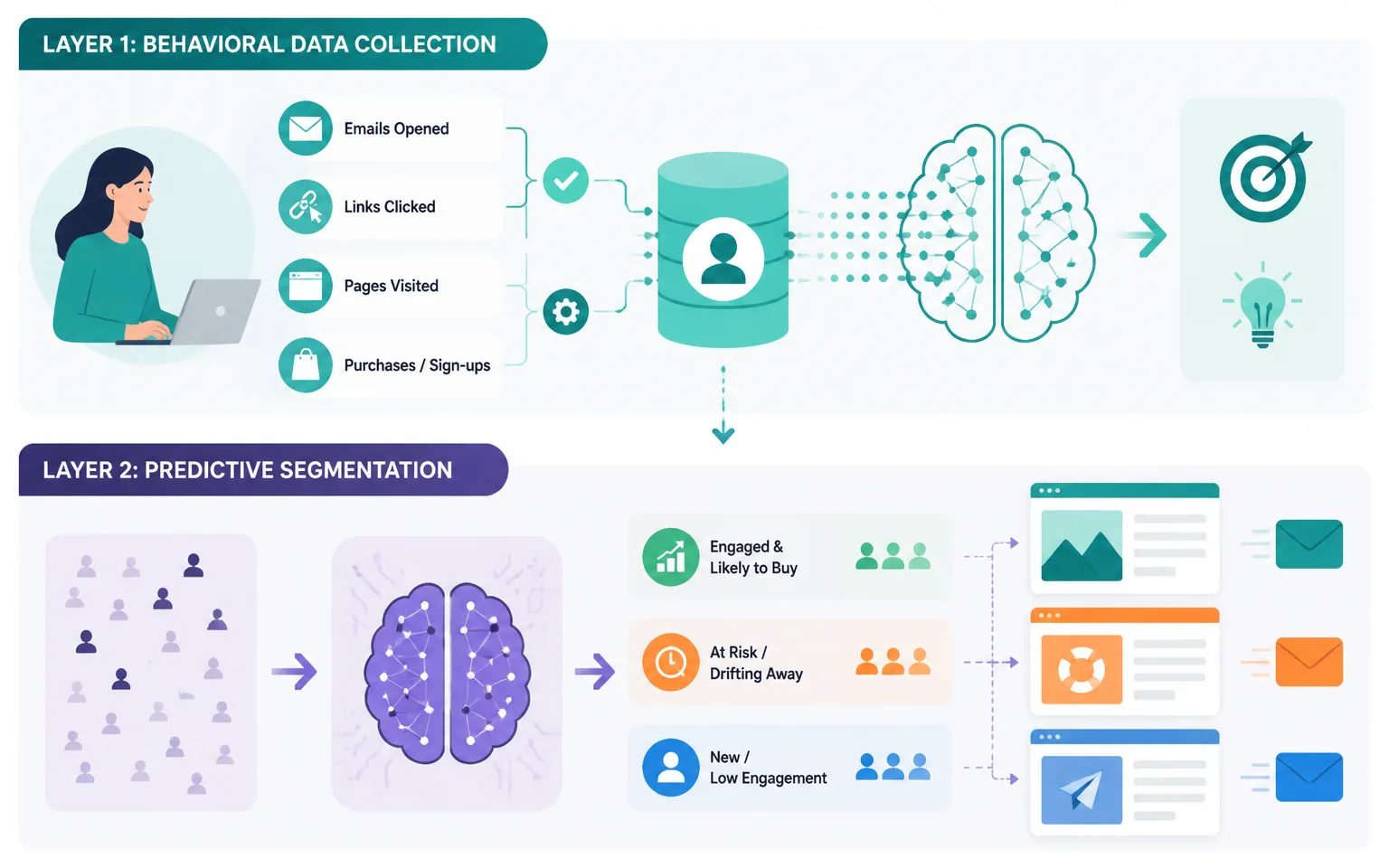
Layer 1: Behavioral Data Collection
Everything starts with what subscribers do, not what they say. I track four behaviors: which emails someone opens, which links they click, which pages they visit on my site, and what they have purchased or signed up for. Every modern email platform captures the first two automatically; the second two need site tracking or integrations, which take about an hour to set up. Without this layer, “AI personalization” is just guessing with extra steps. The AI is only as smart as the behavior you feed it.
Layer 2: Predictive Segmentation
This is where AI earns its keep. Instead of manually building segments like “clicked in last 30 days,” AI models score every subscriber on likelihood to open, click, buy, or churn — and rebuild those segments continuously. My engaged-and-likely-to-buy segment gets product-focused emails; my drifting-away segment gets win-back content. I wrote a full breakdown of this in my guide to AI email segmentation and automation, so I will not repeat it all here, but predictive segments are the skeleton the other layers hang on.
Layer 3: Dynamic Content Blocks
One email template, different content per subscriber. My weekly newsletter has a hero section that swaps based on interest: SEO subscribers see my latest ranking experiment, email-marketing subscribers see a deliverability tip, and affiliate-focused readers see an offer breakdown. I build one email; the platform assembles a personal version for each recipient at send time. This is the layer readers actually notice — the email simply feels like it was written for them.
Layer 4: Send-Time Optimization
AI watches when each subscriber historically opens email and delivers at their personal peak moment — 6:40 a.m. for the commuter, 9:30 p.m. for the night owl. Industry data collected by Digital Applied puts the open-rate improvement from individual-level send-time optimization at 15 to 25 percent, and in my own campaigns it added roughly a fifth more opens without changing a word of copy. It is the closest thing to a free lunch in email marketing.
Layer 5: AI-Written Copy Variants
Finally, I use AI to generate subject line and preview-text variants tuned to different segments, then let the platform pick winners automatically. AI-generated subject lines outperform human-written ones by around 26 percent on opens in recent benchmarks — and my own testing agrees, provided you feed the AI good prompts and real audience context. I covered my exact prompting process in my post on AI email subject lines, and the same principles apply to body copy variants.
My Weekend Workflow: Setting This Up Step by Step
Here is the exact sequence I follow when I set up AI personalization for a list from scratch. Budget one weekend for a list under 20,000 subscribers.
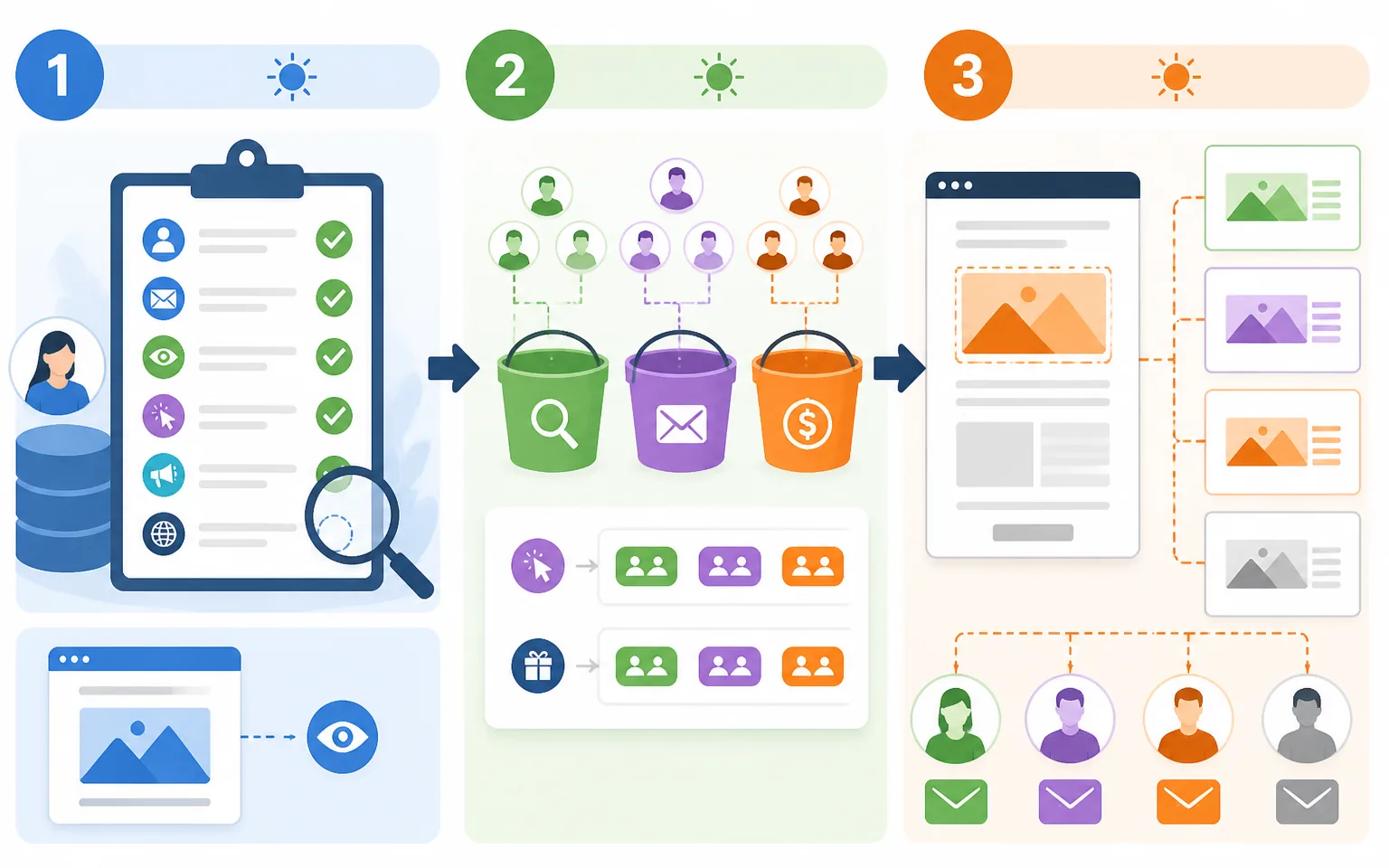
Step 1: Audit Your Data (Saturday Morning)
List every data point you currently capture per subscriber. Most people discover they only have email address, name, and open/click history. That is enough to start — opens, clicks, and signup source alone can power interest-based segments. Add site tracking now so richer data accumulates while you build.
Step 2: Define Three Interest Buckets (Saturday Afternoon)
Resist the urge to create ten segments. Pick the three interests that map to how you make money. For me that is SEO, email marketing, and affiliate income. Tag existing subscribers by their historical clicks — every platform can do a retroactive “clicked links containing X” search. New subscribers get tagged by which lead magnet or page brought them in.
Step 3: Build One Dynamic Template (Sunday Morning)
Take your existing newsletter template and make one section dynamic: the hero block. Three variants, one per interest bucket, plus a default for untagged subscribers. Do not personalize everything at once — a single dynamic block gets you most of the perceived personalization with a tenth of the maintenance.
Step 4: Turn On Send-Time Optimization and AI Subject Lines (Sunday Afternoon)
These are toggles, not projects, in most modern platforms. Enable per-subscriber send-time optimization, then set up subject line generation: I draft one subject myself, generate four AI variants, and let the platform optimize. My prompting approach from my guide to prompt engineering for marketers applies directly here — give the AI your audience, your angle, and a constraint, never just “write a subject line.”
Step 5: Measure Against Your Old Baseline (The Following Two Weeks)
Screenshot your last ten campaigns’ opens, clicks, and revenue per send before you switch anything on. Then compare. If you do not see clicks move within four sends, your segments are probably wrong — usually too broad. Tighten the interest definitions and re-tag.
Where Affiliate Marketers Get Extra Mileage
If you monetize with affiliate offers, personalization is not optional — it is the difference between a list that converts and a list that unsubscribes. Generic affiliate blasts are exactly what makes people leave. But when your drifting SEO-interested subscriber gets a personalized email about the exact rank-tracking tool that matches the tutorials they have been clicking, the promotion reads as a recommendation, not an ad.
I route my affiliate promotions through interest segments so each offer only reaches the bucket that has demonstrated relevant intent, and I let AI pick the send time. Click-through on affiliate sends roughly doubled for me after this change, which matches the industry pattern: AI-optimized campaigns average over 13 percent click-through versus around 3 percent for non-AI campaigns in Digital Applied’s benchmarks. If you want the full monetization side of this, my playbook on affiliate email marketing picks up exactly where this post leaves off.
Mistakes That Quietly Kill Personalized Campaigns
I have made all of these, so learn from my scar tissue.
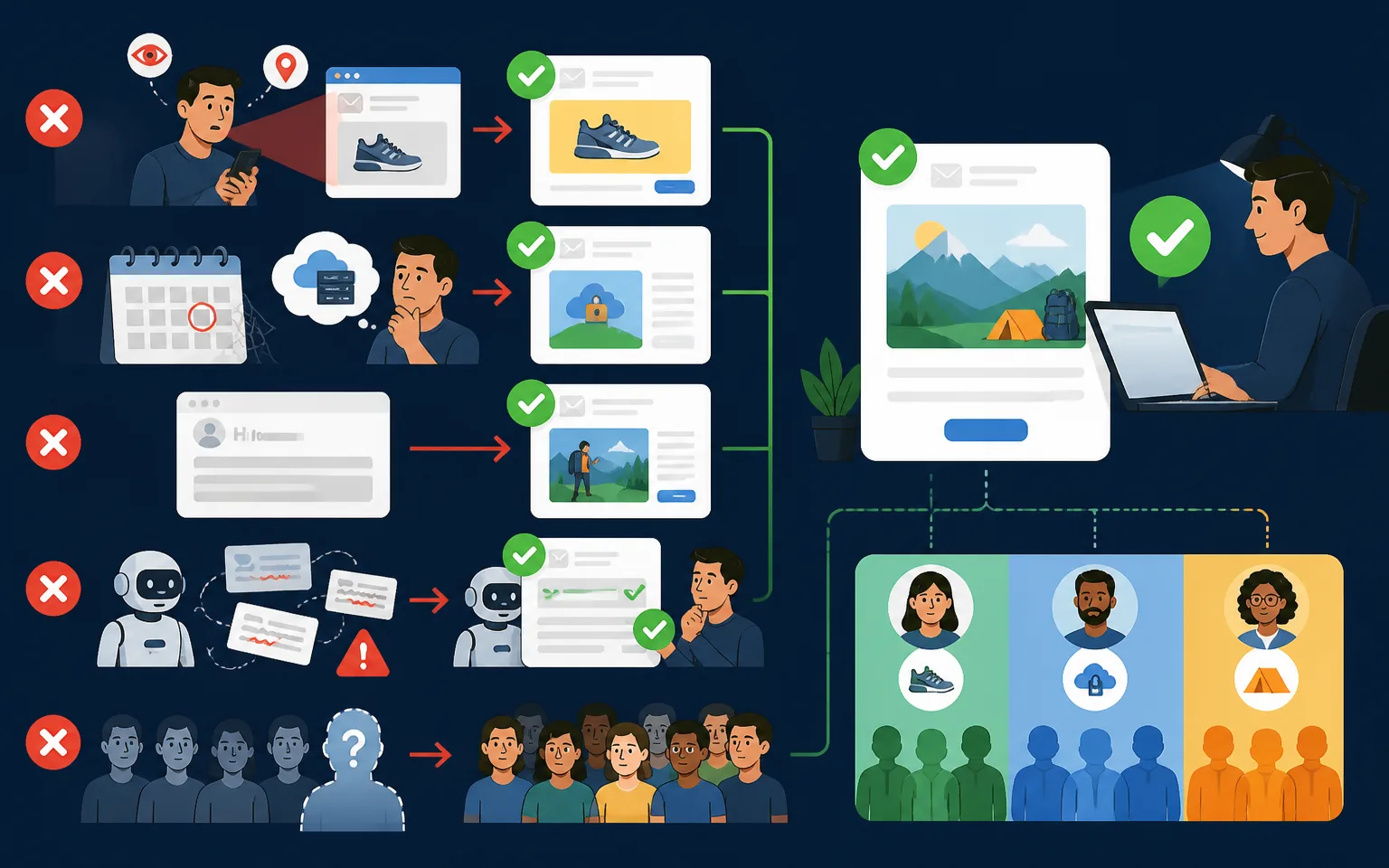
Creepy over-personalization. “I saw you looked at this product three times yesterday” is surveillance, not service. Personalize the content; do not narrate the tracking. The email should feel relevant without explaining why it is relevant.
Personalizing on stale data. A subscriber who clicked a hosting review two years ago is not a “hosting prospect” today. I decay interest tags after 90 days of no reinforcing behavior. Fresh data or no data — never old data dressed up as insight.
First-name-only theater. “Hi Sarah” followed by a completely generic email actively hurts you now, because subscribers have learned that trick. Behavioral relevance beats name insertion every time; name-only personalization delivers a fraction of the lift that behavior-based personalization does in every benchmark I have cited above.
Letting AI run without review. I approve every AI-generated subject line and content variant before it enters rotation. It takes five minutes per campaign and has saved me from off-brand phrasing more than once. AI drafts; I edit; the send goes out in my voice.
Ignoring the untagged majority. Early on, 60 percent of my list had no interest tag and got the boring default email. Fix: a one-question preference email (“What should I send you more of?”) plus click-based tagging on every send. Six weeks later the untagged share was under 20 percent.
Frequently Asked Questions
Do I need a big list for AI personalization to be worth it?
No. The revenue impact scales with list size, but the behavioral models work fine on small lists, and the habits you build early compound. If you have more than about 1,000 subscribers and send weekly, the setup pays for itself. Below that, focus on growth first, but still tag interests from day one so the data is waiting for you.
Which platforms actually support all five layers?
Most mainstream platforms now cover predictive segments, dynamic content, send-time optimization, and AI copy in their mid-tier plans. Rather than name a “best” tool — pricing and features shift constantly — check for those four capabilities plus site tracking before you commit. The layer most often missing on cheap plans is per-subscriber send-time optimization.
Will AI personalization hurt my deliverability?
It usually helps. Higher opens and clicks are positive engagement signals to inbox providers, and suppressing your least-engaged subscribers — which predictive segmentation makes easy — is one of the best deliverability moves available. The risk comes from sending more email just because automation makes it easy. Volume without relevance is what damages sender reputation.
How is this different from the segmentation you have written about before?
Segmentation is one layer of five. Segments decide who gets an email; personalization also shapes what each person sees inside it, when it arrives, and how the subject line is written. If you have already implemented my segmentation workflow, layers three through five in this post are your next step.
How long until I see results?
Send-time optimization and AI subject lines show up in your very next campaign. Dynamic content and predictive segments need two to four sends of data to settle. I tell people to commit to a full month — eight sends on a twice-weekly schedule — before judging the numbers.
Final Thoughts: Relevance Is the Whole Game
Every statistic in this post points at the same truth: subscribers reward emails that feel written for them and ignore everything else. AI has not changed that rule — it has just made following it affordable for a one-person operation like mine. You no longer need an enterprise data team to send emails that adapt to each reader; you need clean behavioral data, three honest interest buckets, one dynamic block, and the discipline to review what the machines write.
Start with the weekend workflow above. Turn on send-time optimization today, tag your list this week, and make one section of your next newsletter dynamic. With the majority of enterprise email programs already using AI somewhere in campaign creation, the personalization bar keeps rising — but for those of us who move early, that bar is a moat.