Best Workflow Automation Software in 2026: Zapier vs Make vs n8n

If you asked me to name the single highest-leverage software decision a small business can make in 2026, I wouldn’t say a CRM, an email platform, or even an AI writing tool. I’d say your workflow automation software — the glue that connects everything else. Pick the right one and every tool you own gets smarter; pick the wrong one and you’ll pay for it in monthly fees, broken workflows, and hours of rebuilding. In this guide I compare the three platforms that dominate the conversation — Zapier, Make, and n8n — based on my own experience wiring up marketing, email, and affiliate workflows for byskh.com. The short answer up front: Zapier is the fastest path for non-technical teams, Make gives you the most automation power per dollar, and n8n is the choice if you want AI agents, self-hosting, and no per-task pricing. The rest of this article explains exactly which one fits your business.
Why Workflow Automation Software Matters More Than Ever
Automation stopped being optional a while ago. The global workflow automation market is estimated at roughly $29.9 billion in 2026 and is projected to reach $87.7 billion by 2033, according to Coherent Market Insights. That growth isn’t driven by enterprises alone — it’s small businesses like yours and mine catching up fast.

The adoption numbers back this up. Research compiled by Thunderbit shows SMB automation adoption jumped from 22% in 2024 to 38% in 2026 — nearly doubling in two years — with an estimated 50% of all SMBs expected to use at least one AI-powered workflow by 2027. If your competitors are automating lead follow-up, email segmentation, and reporting while you’re doing it by hand, that gap compounds every month.
And the payoff is real. A 2024 Duke University CFO survey found that about 60% of businesses had already implemented automation in at least one workflow, while businesses using AI automation report an average 35% reduction in operational costs, according to AdAI News’s 2026 automation statistics roundup. For a one-person or small-team operation, that’s the difference between drowning in admin and actually growing. I covered the broader strategy side of this in my guide to AI agents for small business — this article is about picking the specific software to run those workflows on.
The Three Contenders at a Glance
Before we go deep, here’s how I’d summarize each platform after using all three.
Zapier: The Easy Button
Zapier is the oldest and most polished of the three. Its killer feature is breadth: Digital Applied’s 2026 comparison puts Zapier at 8,000+ app integrations — more than double Make and far beyond n8n. If a SaaS tool exists, there’s almost certainly a Zapier connector for it. In 2026 Zapier also ships Zapier Agents, which let you deploy autonomous AI assistants that act across your connected apps.
Make: Visual Power for Less Money
Make (formerly Integromat) is the visual workflow builder. Instead of linear “trigger then action” chains, you build scenarios on a canvas with routers, iterators, and aggregators — logic that would require expensive premium plans on Zapier. Make connects to roughly 3,000+ apps and now includes Maia, a conversational AI assistant that builds scenarios from a plain-English description.
n8n: The Open-Source Powerhouse
n8n is the developer favorite: open-source, self-hostable, and priced per workflow execution rather than per task. Its 2.0 release in January 2026 shipped native LangChain integration and roughly 70 AI nodes, making it the strongest platform of the three for building genuine multi-step AI agents rather than simple trigger-action automations.
How Do Zapier, Make, and n8n Compare on Pricing?
Pricing is where these three platforms differ most, and it’s where most small businesses get burned. The models are fundamentally different: Zapier charges per task (every single action step counts), Make charges per operation (similar, but cheaper per unit), and n8n charges per execution (one full workflow run counts once, no matter how many steps it contains).
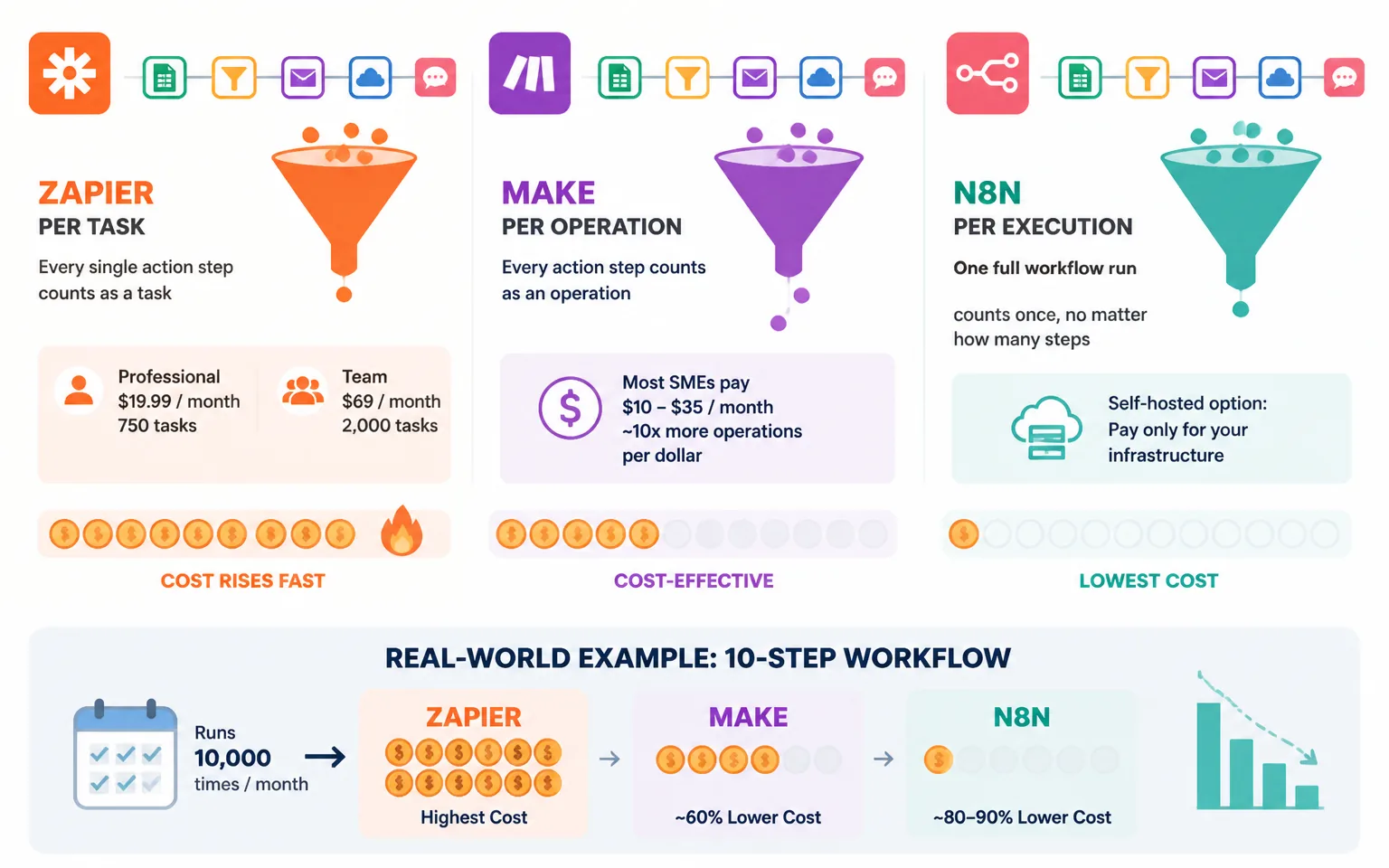
Zapier’s Professional tier starts at $19.99/month for 750 tasks on annual billing, with the Team plan at $69/month for 2,000 tasks. That sounds reasonable until your workflows grow. A 10-step workflow that runs 100 times a day burns 1,000 tasks daily — you’d blow through the Professional allowance before lunch on day one.
Make is dramatically cheaper per unit of work. According to Softomate Solutions’ 2026 comparison, Make delivers visual workflow power at roughly 60% lower cost than Zapier, with most SMEs paying the equivalent of $10–35 per month — and getting roughly 10x more operations per dollar.
n8n changes the math entirely. Because it bills per execution rather than per step, Digital Applied calculates that a 10-step workflow running 10,000 times a month can cost 80–90% less on n8n than on Zapier. And if you self-host the open-source version on a $5–10/month VPS, executions are effectively unlimited. That’s the route I recommend for anyone running high-volume automations like content pipelines or affiliate link monitoring — a use case I walk through in my post on scaling affiliate marketing with AI.
My Pricing Verdict
For fewer than ~500 tasks a month, the price difference barely matters — pick on ease of use. Between 500 and 10,000 operations monthly, Make usually wins. Above that, or for anything multi-step and high-frequency, n8n is the only sane option.
Which Platform Handles AI Automation Best?
This is the question that matters most in 2026, because “automation” and “AI” have effectively merged. All three platforms now offer native connections to OpenAI, Anthropic, and Google Gemini, plus purpose-built AI agent templates — but the depth varies enormously.
Zapier’s approach is agents-as-a-product. Zapier Agents can autonomously execute tasks across its 8,000+ connected apps: triage inbound leads, draft replies, update your CRM. It’s the fastest way to get an AI agent doing useful work with zero code. The trade-off is control — you’re operating inside Zapier’s guardrails, and costs climb quickly since every agent action consumes tasks.
Make’s Maia assistant takes a different angle: describe the workflow you want in plain English and Maia builds the scenario for you. It genuinely lowers the learning curve of Make’s canvas, though its dedicated agent builder was still flagged as beta in early 2026, per Automation Atlas’s tested comparison.
n8n is where serious AI builders end up. The native LangChain integration and ~70 AI nodes let you build agents with memory, tool use, retrieval-augmented generation, and multi-model routing — the kind of architecture I’d previously only seen in custom Python code. If your roadmap includes AI agents that reason across steps rather than just “summarize this and send it,” n8n is the clear choice for complex agent orchestration.
The business case for getting this right is compelling: businesses report an average ROI of 250% on AI automation investments within the first 18 months, according to industry statistics compiled by AdAI News. That return comes fastest when the platform matches your ambition — simple agents on Zapier, complex ones on n8n.
Real-World Use Cases: Which Tool for Which Job?
Email Marketing Automation
For email work — syncing leads into your ESP, triggering sequences, cleaning lists — any of the three will do, so choose based on your platform. Zapier has the widest ESP coverage; if you’re on a less common tool, it’s the safe bet. Make shines when you need to transform data between systems, like splitting and enriching subscriber records before they hit your list. I use exactly these patterns in the workflows described in my AI email segmentation and automation guide, and they transfer directly to any of these platforms.

Affiliate and Content Workflows
Content and affiliate operations tend to be high-volume: checking hundreds of links, repurposing posts across channels, monitoring rankings. These multi-step, high-frequency jobs are precisely where per-task pricing punishes you, which is why I run mine on the execution-based model. McKinsey’s global survey found that 66% of organizations have experimented with business process automation in at least one function — but the winners are the ones who can afford to run automations constantly, not occasionally.
Client-Facing and Team Workflows
If non-technical teammates or clients need to see, edit, or duplicate workflows, Zapier’s interface wins outright. Handing a Make scenario or an n8n canvas to a non-technical VA is asking for trouble; handing them a Zap is usually fine.
Learning Curve and Maintenance: The Hidden Cost
Nobody budgets for maintenance, but every automation stack demands it. APIs change, triggers silently fail, and someone has to notice. Zapier requires the least ongoing attention — its error handling and retry logic are the most mature, and its enormous user base means most problems have a documented fix. Make sits in the middle: more powerful error routing (you can build error-handling paths directly into scenarios), but more surface area to break. n8n demands the most from you, especially self-hosted, where updates, backups, and server security land on your plate.
My rule of thumb: budget one hour per month of maintenance per ten active workflows on Zapier, double that on Make, and triple on self-hosted n8n — unless you have someone technical, in which case n8n’s debuggability actually makes fixes faster. Given that roughly 60% of businesses already automate at least one workflow per the Duke study, the differentiator now isn’t whether you automate — it’s whether your automations stay running while you sleep.
My Recommendation: Match the Tool to Your Stage
Here’s the decision framework I give anyone who asks.
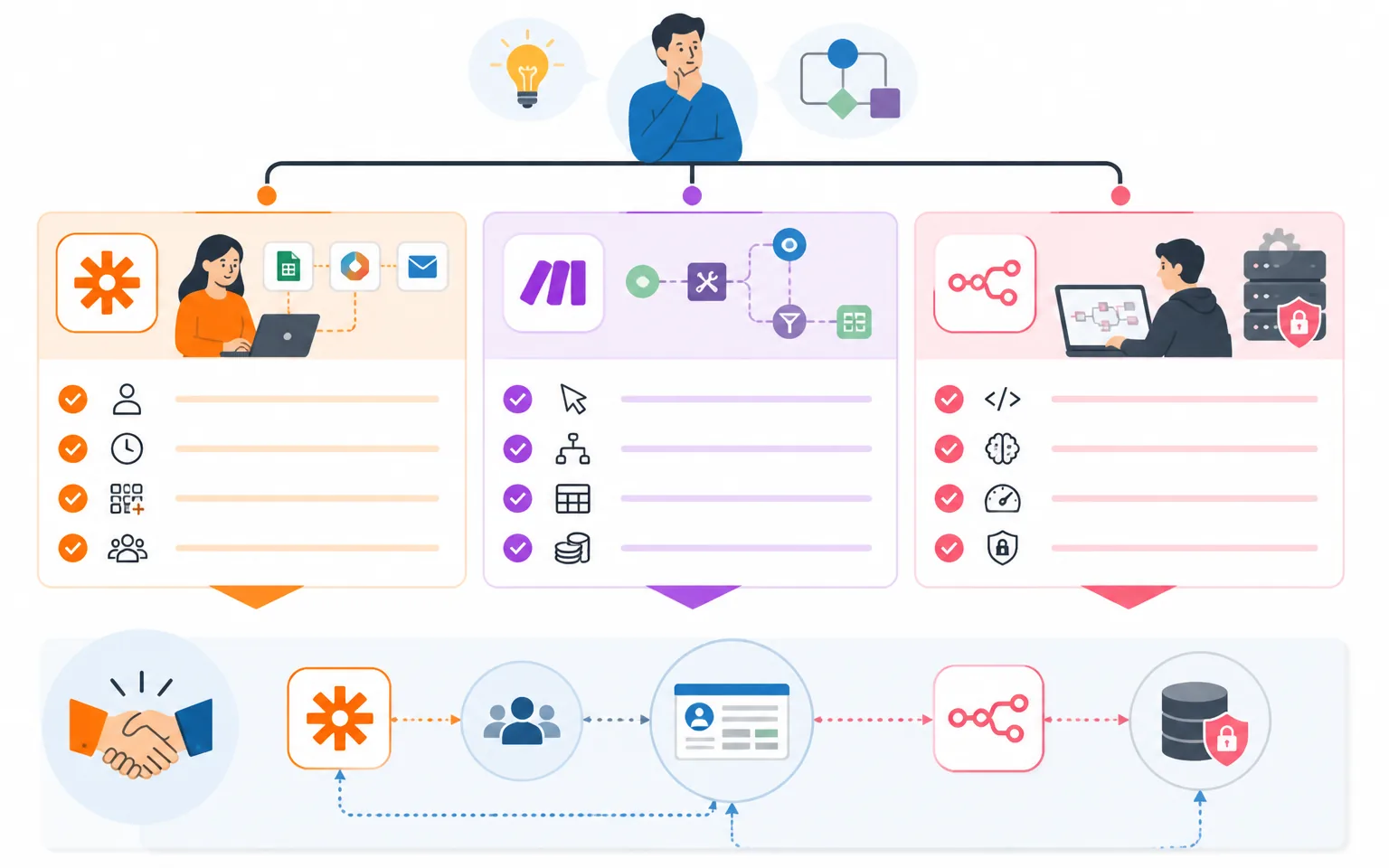
Choose Zapier if you’re non-technical, you value your time over your software budget, you need a long-tail app connected, or teammates will manage workflows. At $20–100/month for most business tiers, it’s the fastest path from idea to running automation.
Choose Make if you’re comfortable with a visual builder, your workflows involve branching logic or data transformation, and you want serious capability at a fraction of Zapier’s cost. It’s the sweet spot for most solo marketers and small teams — powerful enough to grow into, cheap enough to run everything.
Choose n8n if you (or someone on your team) are technical, you’re building AI agents with real complexity, you run high-volume automations, or data privacy demands self-hosting. It has the steepest learning curve and the highest ceiling.
And a practical note: you don’t have to pick just one. I know plenty of operators who keep a $20 Zapier plan for quick client-facing connections while running their heavy internal pipelines on self-hosted n8n. The platforms coexist happily — your CRM doesn’t care which tool updated it.
Frequently Asked Questions
Is Zapier still worth it in 2026 with cheaper alternatives available?
Yes — for the right user. Zapier’s 8,000+ integrations, polish, and reliability still justify the premium for non-technical teams and low-to-medium volume workflows. It stops being worth it when you’re running thousands of multi-step executions monthly; at that point Make or n8n will cut your bill by 60–90%.
Can I really run n8n for free?
The open-source community edition is free to self-host; your only cost is a small server (typically $5–10/month on a VPS). You give up managed hosting, and you’re responsible for updates and backups. n8n’s paid cloud plans exist if you want the power without the server admin.
Which platform is best for AI agents?
n8n, by a clear margin, for complex agents — its LangChain integration and ~70 AI nodes support memory, tool use, and multi-step reasoning. Zapier Agents are the easiest to launch for simple autonomous tasks, and Make’s agent builder is promising but was still in beta as of early 2026.
Will switching platforms later be painful?
Somewhat. Workflows don’t export between platforms, so you’ll rebuild them by hand. That’s why I recommend starting with the platform that matches where you’ll be in twelve months, not just today. Document each workflow’s trigger, steps, and apps in a simple doc — future you will be grateful during any migration.
What should I automate first as a small business?
Start where repetition meets revenue: lead capture to CRM, email list segmentation, and follow-up sequences. These give the fastest measurable return, and with SMB adoption expected to hit half of all small businesses using AI-powered workflows by 2027, they’re quickly becoming table stakes rather than a competitive edge.
Final Thoughts
The best workflow automation software in 2026 isn’t a single winner — it’s a match between tool and operator. Zapier buys you speed and simplicity, Make buys you power per dollar, and n8n buys you control and an AI-agent ceiling the other two can’t touch. Whichever you choose, the worst decision is postponing the choice: in a market growing toward $87 billion, with your competitors’ adoption doubling every two years, the cost of manual work is no longer just your time — it’s your position. Pick the platform that fits your stage, automate one revenue-adjacent workflow this week, and build from there.
Related reading: Best AI Agent Platforms in 2026: The Tools I Actually Use to Run a Lean Business.