Blog Analytics in 2026: How I Track AI Traffic From ChatGPT and Perplexity

Blog analytics broke in 2026, and most bloggers still do not know it. If your sessions are falling while your revenue holds steady — or worse, if your dashboard says “Direct” is suddenly your best channel — you are not looking at a traffic problem. You are looking at a measurement problem. AI assistants now send real, high-intent readers to blogs, but they strip the evidence on the way in.
I run byskh.com myself. In the spring I watched organic sessions slide month after month while affiliate clicks and email signups barely moved. Every report told me the blog was dying. It was not. The readers had simply changed how they arrived, and my analytics had no vocabulary for it.
This is the measurement system I rebuilt from scratch: what to track, how to configure GA4 so AI traffic stops hiding, what your server logs reveal that no analytics tool can, and — the part almost nobody writes about — why the headline “AI traffic converts 4x better” stat deserves a lot more scepticism than it gets.
Key Takeaways on Blog Analytics and AI Traffic
- Most AI traffic is invisible by default. An analysis of more than 446,000 website visits found that 70.6% of AI-driven traffic arrives with no referrer header, so GA4 files it under “Direct.”
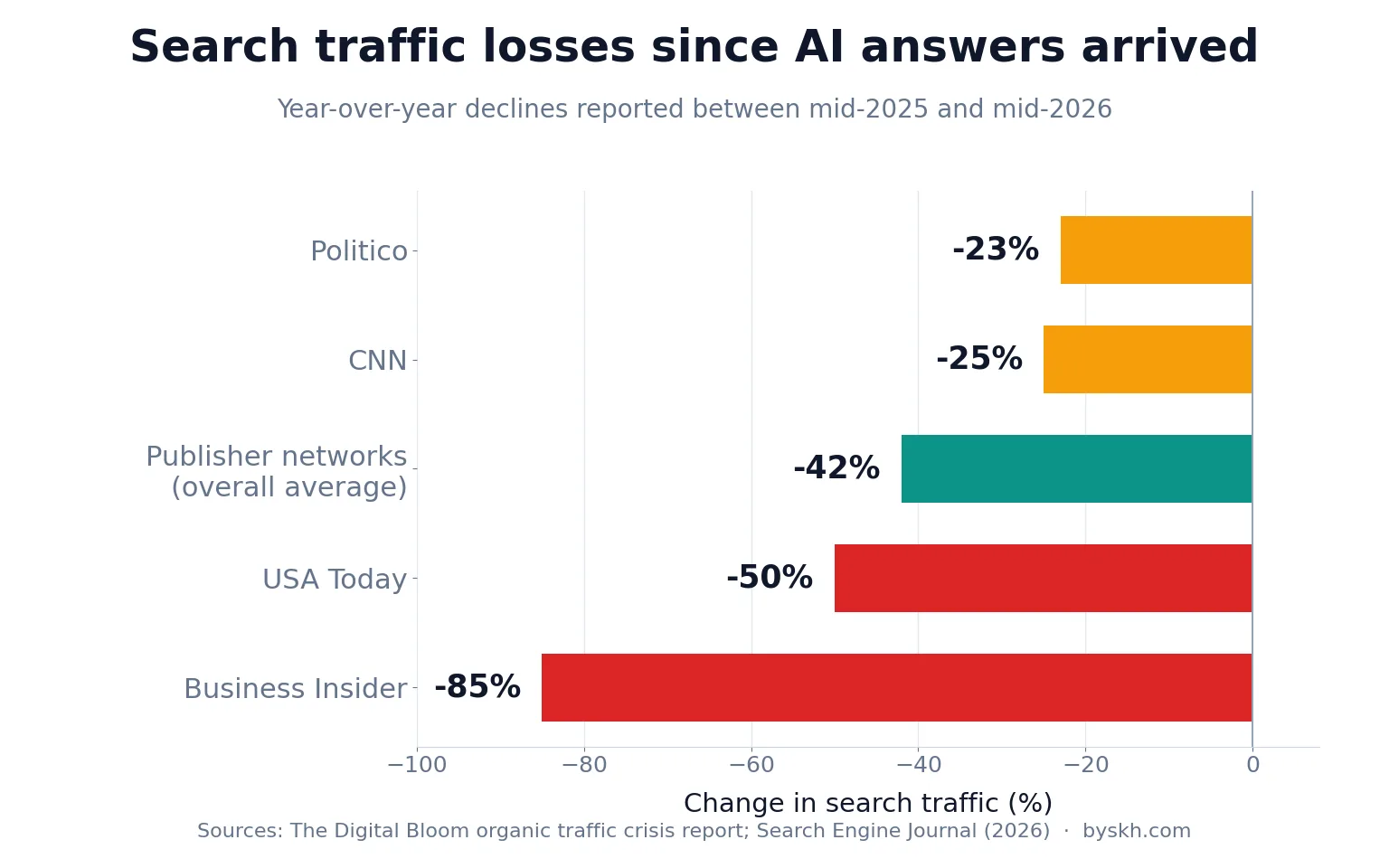
- Session counts are the wrong headline metric now. Search traffic across publisher networks fell roughly 42% from pre-AI-Overview baselines, according to The Digital Bloom’s organic traffic crisis report.
- AI referrals are small but concentrated. AI traffic sits at about 1.08% of all web traffic today — a tiny slice that behaves very differently from the rest.
- The conversion premium is real but contested. Some studies report a 4–5x advantage; a paired t-test in one study found no statistically significant difference at all. Both can be true depending on your niche.
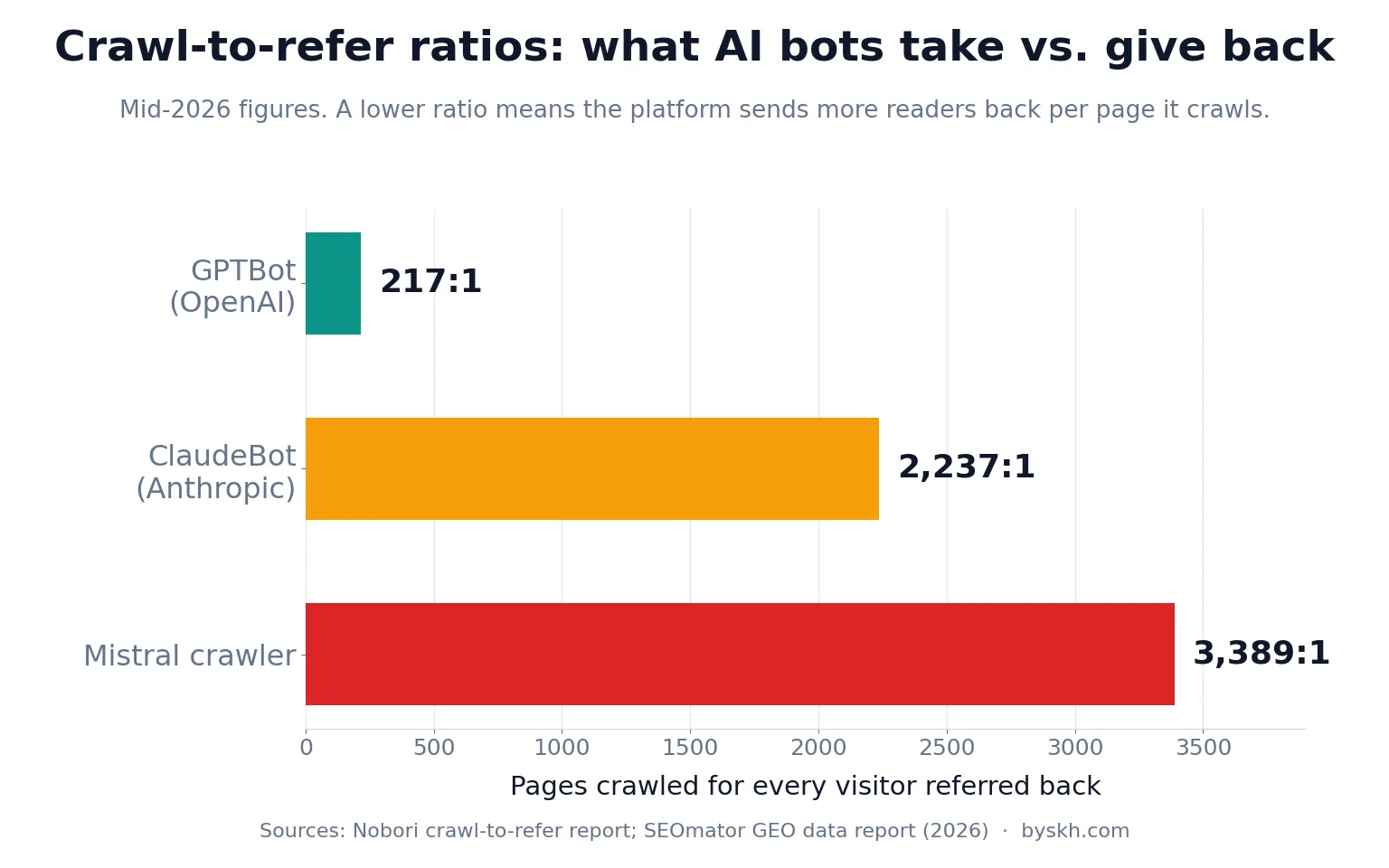
- Server logs beat analytics for AI visibility. Crawl-to-refer ratios show how much AI platforms take versus what they send back — Mistral’s crawler fetches 3,389 pages per referral.
- Track outcomes, not visits. Email captures, affiliate clicks and revenue per thousand sessions survive the attribution mess. Raw pageviews do not.
Why Your Blog Analytics Stopped Telling the Truth
The short answer: readers now get their answer before they ever reach you, and the ones who do reach you often arrive anonymously.
Start with the click side. Roughly 60% of Google searches now end without a click, and inside Google’s AI Mode that figure climbs to about 93%. Ahrefs has measured a 58% CTR decline on the top-ranking page for keywords that trigger an AI Overview, a drop documented across multiple 2026 datasets.
That is not a ranking failure. You can hold position one and still lose most of your clicks.
Large publishers have felt it hardest. Year-over-year declines between mid-2025 and mid-2026 include roughly 50% for USA Today and more than 85% for Business Insider, with Search Engine Journal cataloguing how publishers are adapting. Independent blogs see softer but similar curves.
Here is what makes it a measurement crisis rather than just bad news. Google AI Overviews and AI Mode pass no distinct referral signal — those visits land in google / organic alongside ordinary search clicks. You cannot separate them in standard GA4 reporting. Meanwhile ChatGPT, Perplexity and Claude mostly arrive with no referrer at all.
So your reports show three lies simultaneously: organic looks flat when its composition has changed completely, Direct looks inflated with strangers you never earned credit for, and your best-converting channel does not appear in the channel list.
I wrote about the click-loss side of this in my zero-click search survival guide. This post is the other half: what to do once you accept the clicks are gone and you need to measure what is left.
The Dark Traffic Problem: Where Your AI Readers Actually Go
Direct answer: they go into your “Direct” bucket, and they take their conversions with them.
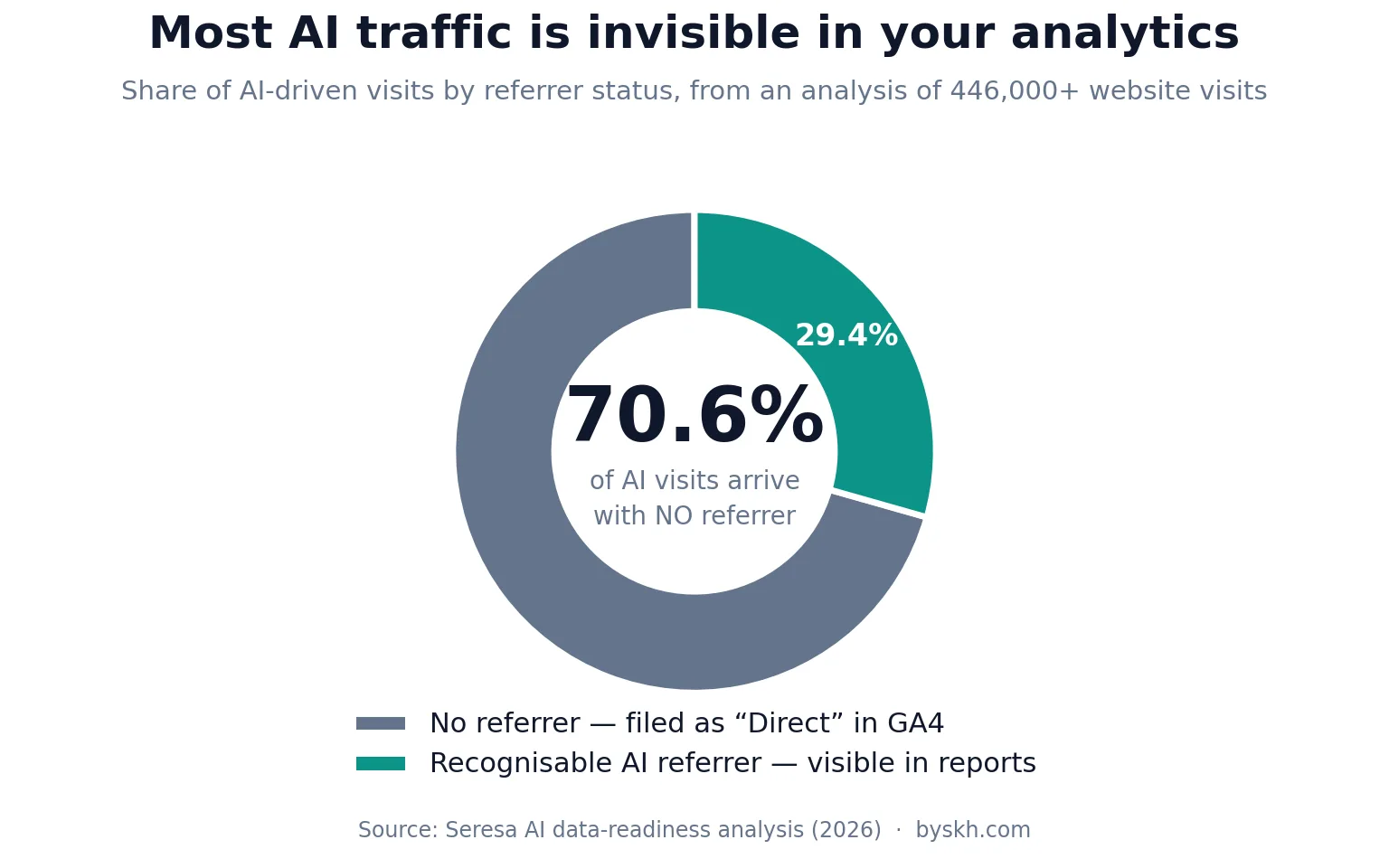
Only about 29.4% of AI-driven visits carry a recognisable AI referrer. The other 70.6% show up as unattributed. That single fact rewrites how you should read every channel report you own.
The consequence is not cosmetic. One analysis found dark AI traffic converting at a 10.21% transactional rate against 2.46% for non-AI traffic — a roughly 4.1x premium sitting invisibly inside Direct. If you allocate effort based on GA4 channel performance, you are systematically underweighting the channel that is working.
I fell into this exactly. For two months I treated my Direct spike as bot noise and ignored it. It was ChatGPT sending me readers who had already been told my post was worth reading — the warmest traffic I have ever had, filed as junk.
GA4 did add a native AI Assistant channel in May 2026, which tags visits from recognised assistants automatically. It helps. But it excludes Perplexity and, critically, every session that arrives without a referrer — which is most of them. Treat it as a floor, not a measurement.
There is a second, quieter distortion. Because AI-referred readers arrive pre-qualified, they behave differently on the page: fewer pageviews, longer time on the one page they came for, higher email signup rates. Against a cross-industry median engagement rate of 52.6%, a page serving mostly AI referrals can look “bouncy” while doing the best commercial work on your site.
How to Set Up AI Traffic Tracking in GA4
Direct answer: build a custom channel group for AI sources, then accept that it will only ever catch about a third of the traffic — and instrument the rest at the point of conversion.
Step one: create a custom AI Search channel group
In GA4, go to Admin → Data display → Channel groups and create a new group. Add a channel called AI Search with a condition matching source contains any of the major assistants: chatgpt.com, chat.openai.com, perplexity.ai, claude.ai, gemini.google.com, copilot.microsoft.com, bard.google.com and meta.ai.
Order matters — place AI Search above Organic Search and Referral so it claims those sessions first. This is the standard configuration recommended in GA4 AI-search setup guides, and it takes about ten minutes.
Do not skip a source because it looks small. Platform share moves fast: ChatGPT’s slice of AI referrals reportedly fell from 89% to 63% as Gemini and Perplexity gained ground. A list you built last year is already wrong.
Step two: mark AI sessions before they become Direct
The channel group handles referrer-bearing sessions. For the rest, you have to capture the signal yourself at the moment someone converts.
Add a hidden field to every email opt-in and contact form that stores the landing page, the referrer string and a first-touch flag from a cookie. Then carry that value into your email platform or CRM so it survives to the outcome you care about. Pairing a custom channel group with UTM parameters and a hidden form field is the approach most CRM-side attribution guides converge on.
This is the single highest-leverage change I made. It turned “I think AI is sending readers” into a number I could act on.
Step three: add a simple on-site survey
One question on the thank-you page — “How did you find us?” — with five options. It is unfashionable, low-tech, and it caught referral sources my technical setup missed entirely. Self-reported attribution is noisy, but noise beats a blank field.
Step four: watch Search Console separately
Search Console still reports impressions and clicks for queries where AI Overviews appear, bundled into ordinary organic data. Track impressions versus clicks as a ratio over time. A rising impression count with flat clicks is the clearest early signal that AI answers are intercepting your readers — and it shows up months before revenue moves.
What Server Logs Tell You That GA4 Never Will
Direct answer: logs show you what AI systems are taking from your blog, which is the leading indicator for what they will eventually send back.
Analytics only fires when a human loads your page with JavaScript enabled. AI crawlers do not. So the entire ingestion side of AI search — the part that determines whether you get cited at all — is invisible in GA4 and fully visible in your raw access logs.
A log study across 35-plus sites put typical per-crawler daily volume at roughly 4,200 hits for GPTBot, 1,800 for ClaudeBot and 980 for PerplexityBot, according to Digital Applied’s AI crawler statistics. On a small blog the absolute numbers are lower, but the shape is the same.
The metric worth watching is the crawl-to-refer ratio: pages crawled divided by visitors sent back. As of mid-2026, OpenAI’s GPTBot sat around 217:1 while Anthropic’s ClaudeBot ran near 2,237:1, with SEOmator tracking the full comparison across bots. Extractive is the polite word.
You do not need expensive tooling. Most hosts expose raw access logs; a few lines of grep against user-agent strings will give you crawl counts by bot and by URL. Longitudinal log work — one 48-day study tracked 19 different AI bots — shows crawl patterns cluster hard around a handful of pages.
That clustering is the actionable part. The pages the bots hammer are the pages the models consider authoritative on your site. If your commercially important posts are not in that set, you have a content problem, not a traffic problem — and it is the same fix I describe in my guide to optimising for AI search.
The Blog Metrics I Actually Track Now
I cut my dashboard from about twenty metrics to six. Here is what survived and why.
Revenue per thousand sessions, not sessions
If your traffic composition is changing, absolute session counts tell you nothing about health. Revenue per session — total revenue divided by sessions over a period — is the metric that actually normalises for that shift. My sessions fell 31% over four months; my revenue per thousand sessions rose 58%. Only one of those numbers meant anything.
For ad-funded blogs the equivalent is RPM, and the benchmarks are public. Journey by Mediavine reported average RPMs around $28.60 in 2026, one of several figures in the Blogging Income Survey. Know your number before you panic about traffic.
Email capture rate, segmented by landing page
Email is the only channel nobody can deprecate out from under you. I track signups divided by sessions, per landing page, weekly. AI-referred pages routinely outperform here — Microsoft Clarity data across more than 1,200 publisher and news sites found LLM-referred visitors converting to signups at 1.66% versus 0.15% from organic search, an order-of-magnitude gap on that specific event.
Engaged session rate by source
GA4 defines an engaged session as one lasting ten-plus seconds, firing a conversion event, or reaching two-plus pageviews. Compared across sources, it is the fastest way to tell warm AI referrals from scraped junk.
Citation share
Once a month I ask ChatGPT, Perplexity and Gemini the ten questions my best posts are built to answer, and I record whether byskh.com is cited. It is manual, it is imperfect, and it is the only direct read on AI visibility available to a solo blogger. AI tools most commonly send readers to blog posts, how-to guides, comparison pages and detailed explainers — so those are the formats worth testing.
Crawl coverage
Which of my URLs did AI bots fetch this month, and did my money pages make the list? Straight from the logs, five minutes.
Assisted conversions from Direct
Since most AI traffic hides in Direct, I now watch Direct’s conversion rate as a proxy signal. When Direct’s conversion rate climbs well above your site average, that is not loyal returning readers. That is AI referrals wearing a disguise.
Why the "AI Traffic Converts 4x Better" Claim Deserves Scepticism
This is the part most blog-analytics posts skip, and it is the part that will save you from a bad decision.
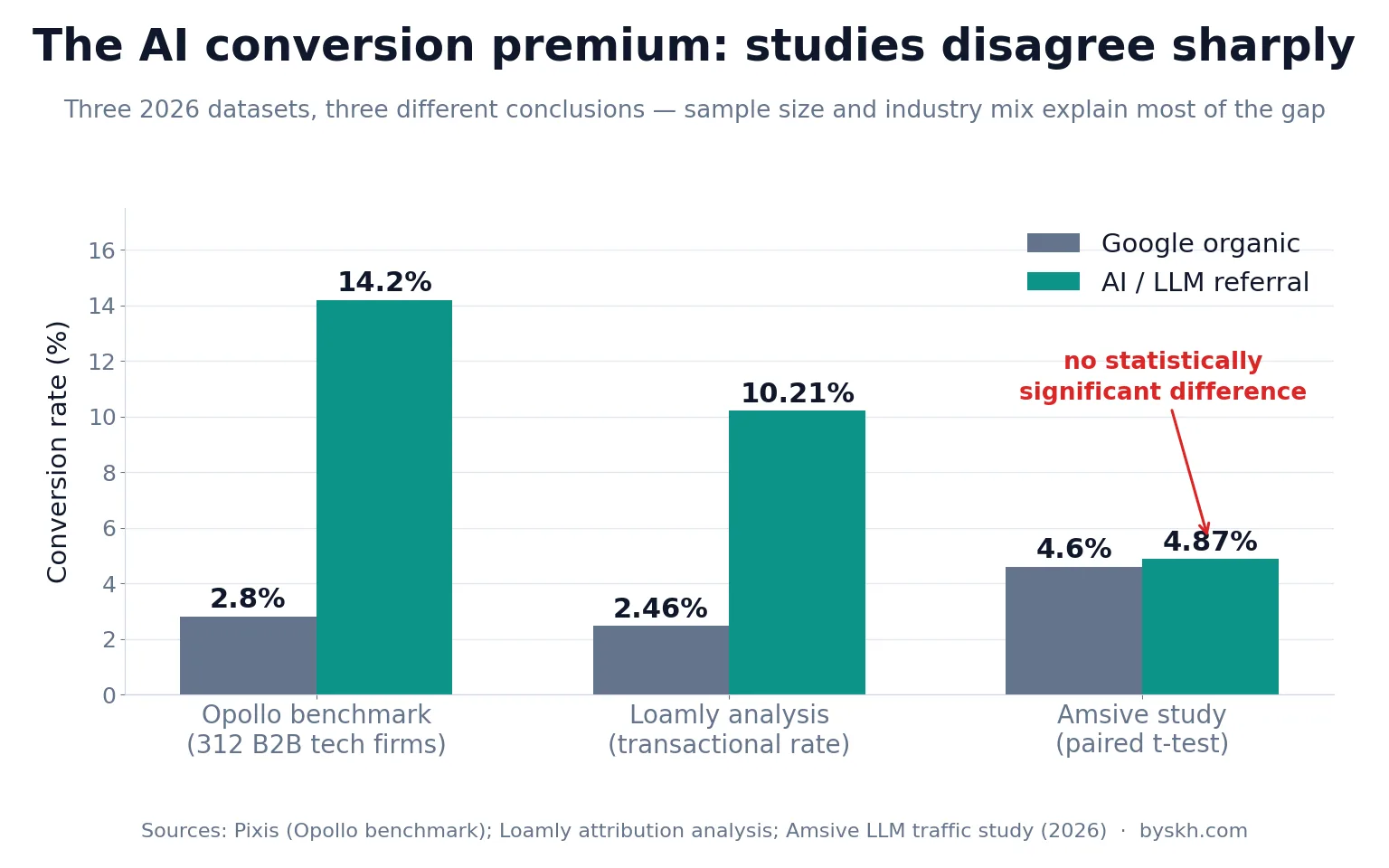
The headline stat is everywhere: AI search traffic is worth roughly 4.4x more than organic. Bigger numbers circulate too. A benchmark report covering 312 B2B technology firms found AI-referred visitors converting at 14.2% against Google organic’s 2.8% — about 5x, a spread Pixis breaks down in detail. Adobe Analytics reported AI-referred shoppers to US retail sites converting 42% better than non-AI traffic in March 2026.
Now the inconvenient study. Amsive’s analysis found organic traffic converting at 4.60% and LLM referrals at 4.87% — with a paired t-test confirming the difference was not statistically significant.
Both results are honest. They differ because of three things worth naming, and the methodological caveats are well documented:
- Sample bias. Many of the flattering studies draw on marketing, SaaS and tech companies, whose audiences are the earliest and heaviest AI adopters.
- Tiny denominators. When AI is 1% of your visits, a handful of conversions swings the rate wildly. Percentages built on forty sessions are anecdotes with decimal points.
- Attribution fragmentation. If 70% of AI traffic is misfiled as Direct, then the AI cohort you can see is a non-random subset — likely the users who clicked a visible citation link, who are self-selected as more motivated.
My practical position: assume AI referrals are meaningfully better than average but not magically so, and refuse to make budget or content decisions on any cohort smaller than a few hundred sessions. Measure your own blog. The cross-industry average is a starting hypothesis, not your number.
The broader trend is real regardless. AI referral traffic is projected to reach 20–28% of total referral traffic by the end of 2026, per Indexly’s state of LLM referral traffic. You are building measurement for where the traffic is going, not where it is.
My Weekly Blog Analytics Routine
Fifteen minutes, every Monday. Here is the actual worked routine.
Minutes 1–3: the two-number check. Revenue per thousand sessions and email capture rate, week over week. If both are stable, traffic decline is noise and I move on. This alone has stopped me rewriting perfectly good posts in a panic at least four times.
Minutes 4–7: the AI Search channel. Sessions, engaged session rate and conversions from my custom channel group, plus Direct’s conversion rate as the proxy for hidden AI traffic. I am looking for divergence, not absolute values.
Minutes 8–11: Search Console impressions-to-clicks. I sort by impression change. Any page gaining impressions while losing clicks goes on a list — that is AI Overview interception, and the fix is usually adding a genuinely quotable, specific passage the model cannot summarise away, which is the same discipline behind refreshing old posts for more traffic.
Minutes 12–15: log skim. Grep the week’s access log for AI user-agents, count hits by URL, confirm my highest-value pages are being crawled. If a money page has zero AI crawls in a month, something is blocking it — robots.txt, a plugin, or thin internal linking.
Monthly, I add the citation-share check and one deeper question: which single page produced the most email signups per session? That page gets a sequel.
Mistakes I Made Setting This Up
I chased the wrong alarm for two months. Falling sessions looked like an emergency. It was a composition change. I rewrote three posts that did not need rewriting and left the actual opportunity — the Direct spike — untouched.
I trusted GA4’s native AI Assistant channel as complete. It is not. It misses Perplexity and every referrer-less session, which is the majority. It is a useful floor and a terrible ceiling.
I did not instrument forms early enough. Every week without hidden attribution fields on my opt-ins was a week of unrecoverable data. This is the one thing I would tell any blogger to do today, before touching anything else in this post.
I over-indexed on cross-industry benchmarks. The 4.4x number is not a promise. My own AI cohort converts better than organic, but nowhere near 4x — and knowing that stopped me over-investing in a channel that is still a small share of my readers.
I ignored logs for far too long. I assumed they were a technical-SEO concern. They are now my best early-warning system, and monitoring AI crawler activity in server logs turned out to be simpler than any analytics configuration I attempted.
Summary
Blog analytics in 2026 is no longer about counting visits. It is about reconstructing the truth from data that has been deliberately stripped of its origin. Most of your AI traffic arrives anonymously, your organic bucket now silently mixes AI-intercepted queries with real clicks, and your best-converting readers are probably sitting in Direct where you cannot see them.
The fix is layered, not clever. Build a custom AI Search channel group so you catch the third of AI sessions that carry a referrer. Instrument your forms so first-touch context survives to the conversion. Read your server logs to see what AI systems take from you and whether your important pages are in that set. Then switch your headline metric from sessions to revenue per thousand sessions and email capture rate, because those two survive the attribution chaos intact.
And hold the industry stats loosely. The gap between a study claiming a 5x conversion premium and one finding no significant difference is not dishonesty — it is sample size, industry mix and attribution noise. Your own blog’s numbers are the only ones that should change your behaviour.
Frequently Asked Questions
How do I know if ChatGPT is sending traffic to my blog?
Check GA4 for sessions with source chatgpt.com or chat.openai.com, but treat that as a fraction of the real figure. Since roughly 70% of AI visits arrive without a referrer, a better combined signal is a rising Direct channel whose conversion rate sits well above your site average, plus GPTBot activity in your server logs. If all three move together, ChatGPT is sending readers.
Why did my Direct traffic suddenly increase?
Most likely AI referrals. Assistants frequently open links in ways that drop the referrer header, so those sessions land in Direct alongside bookmarks and typed URLs. The tell is behaviour: genuine Direct traffic is returning readers with high pageview counts, while disguised AI traffic tends to hit one deep page, engage heavily with it, and convert at an unusually high rate.
Can I track Google AI Overviews traffic separately in GA4?
No, not in standard reporting. AI Overviews and AI Mode pass no distinct referral signal, so those clicks land in google / organic mixed with ordinary search traffic. The workaround is Search Console: track the impressions-to-clicks ratio per page over time. A page gaining impressions while losing clicks is almost certainly being intercepted by an AI answer above it.
What is a crawl-to-refer ratio and why should a blogger care?
It is the number of pages an AI crawler fetches from your site for every visitor its platform sends back. Ratios in the hundreds or thousands to one are normal, which tells you AI platforms are net extractors today. It matters because crawl activity is the leading indicator of citation: if a bot never fetches your best page, that page can never be cited or recommended.
Should I block AI crawlers in robots.txt to protect my content?
It is a genuine trade-off with no universal answer. Blocking stops extraction but also removes any chance of being cited and receiving referral traffic, which is currently the only upside on offer. My own view for a growing blog is to stay open, since visibility inside AI answers is becoming a discovery channel in its own right — but if your revenue depends entirely on ad impressions rather than conversions, the calculation looks different.
Which single metric should a small blog track first?
Email capture rate per session, segmented by landing page. It is immune to referrer stripping because you measure it at the moment of conversion, it works at small sample sizes, and it points directly at which content earns trust. Revenue per thousand sessions is the natural second metric once you have enough volume to make it stable.
Conclusion
The blogs that come through this transition well will not be the ones with the biggest traffic numbers. They will be the ones that knew, week by week, which readers were actually worth having — and could still see them after the referrer disappeared.
Start with the two changes that cost the least and return the most: a custom AI Search channel group in GA4, and hidden attribution fields on every form. You can do both this afternoon. Everything else in this post builds on that foundation, and none of it works without it.
If your traffic is genuinely down rather than just misattributed, my guide to getting traffic to a new blog covers the acquisition side. Measure first, though. You cannot fix a problem your dashboard is describing incorrectly.