Discover the Advantages of Google Workspace in 2026

The biggest advantages of Google Workspace are real-time collaboration, professional business email, secure cloud storage, and an integrated suite of apps (Gmail, Drive, Docs, Meet, and more) that lets teams work together from any device, anywhere. It replaces a patchwork of separate tools with one connected platform, which streamlines communication, tightens security, and scales from solo professionals to large enterprises and schools.
If you have ever asked, “What are the advantages of Google Workspace?”, this guide breaks down exactly what the suite includes, who it is for, how its plans compare, and why so many modern businesses run on it. Formerly known as G Suite and Google Apps, Google Workspace is built for organizations that need to move fast in the digital age, with mobile apps designed to keep work flowing wherever your team happens to be.
What Is Google Workspace? A Quick Summary
Google Workspace is a cloud-based productivity suite that bundles email, document creation, video conferencing, file storage, and team management into a single integrated platform. Here is the short version of why it matters:
- Unlock a full set of productivity apps and collaboration features in 2026, all connected under one account.
- Get started quickly by choosing the right plan, then setting up accounts and your custom domain name and managing everything through the Admin Console.
- Benefit from enterprise-grade security and privacy controls, plus exclusive Chrome browser features that maximize efficiency.
Exploring the Advantages of Google Workspace Apps
The core advantage of Google Workspace is its connected suite of apps that make work more effective and improve teamwork across organizations of every size. Previously known as G Suite and Google Apps, it brings together the tools your team uses all day into one place.

At the core are staples like Gmail and Drive, along with Docs, Sheets, and Slides. Rounding out the suite are Meet for video conferencing, Chat for instant messaging, Calendar for scheduling, and Keep for note-taking. Together they form one complete toolkit.
With this suite, your team collaborates better and can securely access the data they need no matter where they are or which device they use, a major boost to any organization’s productivity.
Gmail for Business
Gmail for Business gives you a professional email address on your own domain, which builds instant trust with clients. Beyond the polished look, it adds stronger security measures and seamless syncing with the rest of Google Workspace.
Your team communicates safely while presenting a sophisticated impression to customers, because enterprise-grade protection guards your data at all times. Thanks to Google Keep integration, users also get task lists that sync across every device without any hassle. (A professional address matters more than most owners realize; see why business email is important for your company.)
Google Drive: Storage and Collaboration
Google Drive is the storage backbone of Google Workspace, providing secure cloud storage and collaboration tools that empower your whole team. People can access files from any device, search the cloud in real time, and edit together, with no more emailing multiple versions of the same document back and forth.
That streamlines workflows and improves efficiency. Storage scales with your needs: basic plans start at 30GB per user, while higher Enterprise tiers offer pooled or expanded storage along with advanced analytics and 24/7 customer support.
Google Docs, Sheets, and Slides: Real-Time Collaboration
Docs, Sheets, and Slides let multiple people work on the same document, spreadsheet, or presentation at the same time, from anywhere. Concurrent editing makes them ideal for brainstorming together or making quick changes to shared files.

Pair that with Google Meet for video calls and Chat for instant messaging, and teams communicate far more effectively no matter where they are based.
Key Google Workspace Features at a Glance
If you want the headline benefits in one list, Google Workspace lets you:
- Make decisions faster, face to face, with video meetings.
- Collaborate on files in real time.
- Store and share files securely in the cloud.
- Protect your data and devices with built-in security.
- Communicate more effectively with Google Voice.
Maximizing Productivity on Mobile Devices
Google Workspace delivers a consistent experience across every device, so your team stays productive whether they are at a desk or on the move. Mobile apps are available for Gmail, Calendar, Drive, Docs, Sheets, Slides, Meet, Chat, and Keep, keeping everyone connected in any situation.
While Sites and Forms do not yet have dedicated mobile apps, both remain fully accessible through a mobile browser, so you can manage them away from your desk. With this mobile-friendly toolkit, teams maximize productivity and keep projects moving by staying connected to Google Workspace from anywhere.
Google Workspace for Education: Empowering Learning
Google Workspace for Education gives qualifying schools free access to core apps and features built to strengthen teaching and learning. Students and educators get the tools they need, including Meet, Drive, Docs, Sheets, Slides, and Forms, in an environment that encourages creativity and collaboration.
Google Classroom gives teachers an efficient way to deliver lessons, while students submit assignments online and receive feedback without delay, making the whole learning loop faster and more organized.
Customizing Your Experience: Google Sites and Forms
Google Sites and Forms let anyone build custom websites and forms without writing code. They simplify data collection, support collaboration, and let you assemble pages from templates using simple grids and layouts.
You can pull in content from other Google Workspace apps too, so it is quick to spin up team wikis, project pages, and even public-facing sites. Google Forms is a powerful survey builder that lets you create tailored questionnaires in minutes.
Every response can flow straight into Google Sheets, where you can organize the data and draw insights that sharpen your decision-making. Used together, these apps help your organization streamline processes, improve access management, and amplify collaborative work.
Integrations: Boosting Efficiency with Third-Party Apps
Google Workspace uses single sign-on to connect with hundreds of third-party applications. Through the Google Workspace Marketplace, companies can choose from a wide range of integrations that extend what the suite can do.
Popular options include CRMs like Salesforce, project management tools like Trello, and communication platforms like Slack. Connecting these external apps creates smoother cross-department workflows, reduces the risk of data errors, and lifts overall efficiency.
Understanding Google Workspace Plans
Google Workspace offers a range of plans for individuals, businesses, and enterprises, so you can match features and storage to your needs and budget. Whether you need basic email and calendar functionality or advanced security with expanded storage, there is a plan to fit.
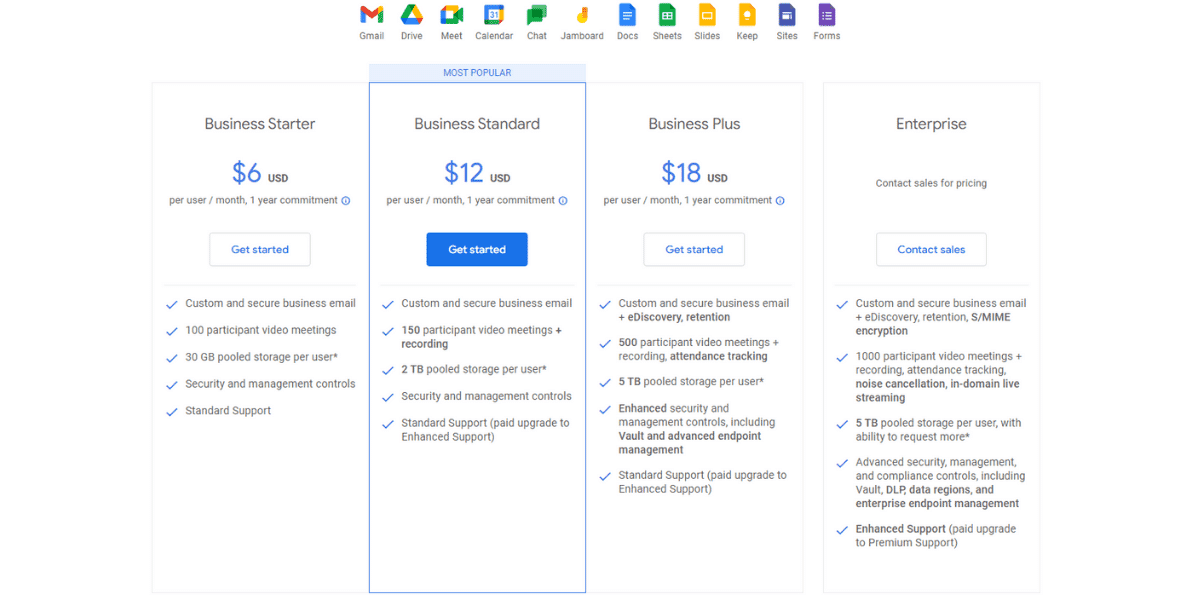
Special Enterprise plans are available for eligible educational institutions and nonprofits, giving them tailored services for their specific requirements. No matter your business type, from an individual account to a small company or a large enterprise, Google Workspace offers a package that fits, including options for expanded storage and discounted access for education and nonprofit organizations.
Getting Started with Google Workspace
Setting up Google Workspace is straightforward: choose the plan that suits you, then configure your accounts and domains. Administrators can manage all of this from the Admin Console, and if you are new to the platform, the 14-day free trial lets you explore the full feature set before committing, so you make an informed choice for your business.
Choosing the Right Plan
Google Workspace plans suit businesses big and small, including Starter, Business Plus, and Enterprise. Every option includes a custom-domain email address, video and voice calls, and storage starting at 30GB per user on the basic plan.
Larger organizations or those needing stronger protection can step up to higher Enterprise tiers, which add advanced security measures, deeper admin controls, and expanded storage.
Setting Up Accounts and Domains
Once you have chosen the right plan, the next step is setting up your accounts and custom domain. If you are launching a new company and do not already own a domain, you can register one during setup.
After that, you will be guided to create and configure the workspace accounts tied to your domain. Verifying your domain links it to Google Workspace so your email and apps run under your own brand.
Managing Your Workspace with the Admin Console
The Admin Console is the central hub for managing Google Workspace. From one place you can add users and groups, configure app and security settings, control user access, and manage devices.
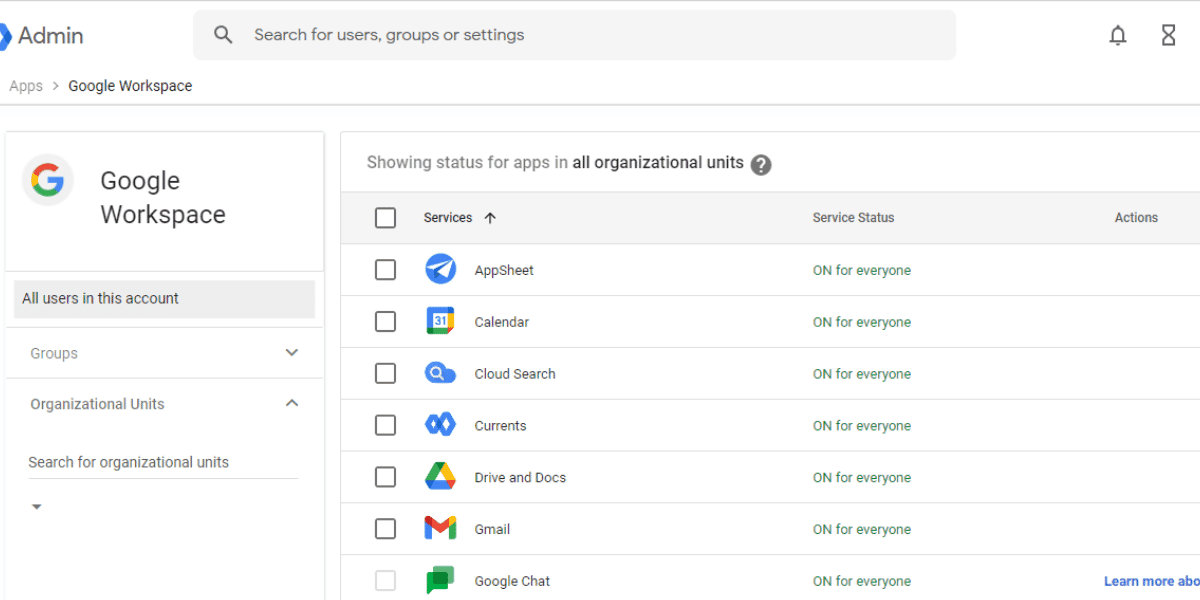
It also surfaces usage analytics across your apps, helping you boost productivity and protect data with controls like two-factor authentication and custom business domains for Gmail. In short, the Admin Console helps you run your workspace smoothly, with the right security settings and parameters in place.
Enhancing Productivity with the Chrome Browser
Google Workspace apps work in any modern browser, but using Chrome unlocks extra advantages. Chrome lets you sync a bookmark bar across devices for seamless access wherever you sign in.
It also enables offline access to Docs, Sheets, and Slides, so you can keep working without an internet connection. Tapping into Chrome’s features alongside Google Workspace helps you work smarter and stay efficient across every app.
Security and Privacy in Google Workspace
Google Workspace includes a comprehensive set of security and privacy protections, from encryption and disaster recovery to secure app configurations, all designed to safeguard your information. Google Vault lets organizations archive data securely and run electronic discovery for stronger compliance and records management.
With these layered protections in place, your organization can trust that sensitive material stays guarded, giving you peace of mind across your digital workspace.
Comparing Google Workspace Alternatives
Before committing, it is worth weighing Google Workspace against alternatives like Microsoft 365, Zoho Workplace, and Nextcloud. Each platform offers different strengths, so the best fit depends on your specific needs and preferences.
Microsoft 365 appeals to many because of its familiar Word and Excel interface, while Zoho Workplace and Nextcloud attract teams with particular budget or self-hosting requirements. Comparing the advantages and trade-offs of each helps you choose deliberately rather than defaulting to the first option you see.
Frequently Asked Questions
What are the main advantages of Google Workspace? The main advantages are real-time collaboration across Docs, Sheets, and Slides; professional business email on your own domain; secure cloud storage with Drive; integrated video and chat through Meet and Chat; and centralized management with strong security, all in one connected platform that works on any device.
Is Google Workspace free, or is it different from Gmail? Standard Gmail is free for personal use, while Google Workspace is a paid subscription that adds a custom-domain email address, full administrative control, more storage, and business-grade security. Plans typically range from about $6 to $18 per user per month.
What is Google Workspace called now, and what was it before? Google Workspace is the current name for the suite previously known as G Suite and, earlier, Google Apps for Your Domain. It was rebranded as Google Workspace on October 6, 2020, uniting Gmail, Calendar, Drive, Docs, Sheets, Slides, Meet, and more under one platform.
What core apps are included in Google Workspace? Core apps include Gmail, Google Drive, Docs, Sheets, Slides, Meet, Chat, Calendar, and Keep, supported by admin and security tools. Together they enable real-time collaboration, secure file sharing, and streamlined workflows for teams that need speed and reliability.
How do I access Google Workspace apps on mobile devices? Simply download the individual apps, such as Gmail, Drive, Docs, and Meet, from the Google Play Store on Android or the Apple App Store on iOS. Sites and Forms have no dedicated app but remain accessible through a mobile browser.
Is Google Workspace suitable for schools? Yes. Google Workspace for Education gives qualifying institutions free access to core apps plus Google Classroom and education-specific tools, making it a strong, secure fit for teaching and learning.
Conclusion
Google Workspace delivers a connected set of productivity tools that improve communication, collaboration, and efficiency for businesses, schools, and nonprofits of every size. From professional Gmail and real-time Docs editing to secure Drive storage, mobile access, and centralized admin controls, the advantages add up to one well-integrated digital workspace. Choose the plan that fits your needs, start with the free trial, and you can unlock the platform’s full potential, with cloud collaboration and security built in from day one. For email-first teams, it also pairs naturally with smarter email marketing practices and tools to extend your reach.