MCP for Marketers: How I Connected AI to My Whole Marketing Stack in 2026

MCP for marketers is the shortest path I have found to making AI actually useful inside a real marketing stack, because it lets an assistant read your live analytics, CRM records, and search data instead of guessing from a pasted screenshot. MCP stands for Model Context Protocol, an open standard that gives AI models a consistent way to call your tools.
I spent most of this year rebuilding how I work with AI around it. The difference is not subtle. Before MCP, I was a copy-paste courier between ChatGPT and six browser tabs.
Now I ask a question in plain English and the assistant pulls the numbers itself. Adoption data says I am not alone: MCP hit 97 million monthly SDK downloads by March 2026, up from roughly 100,000 at launch — a 970x jump in about eighteen months.
This guide is what I wish someone had handed me in January. What MCP is, which servers are worth your time as a marketer, the exact way I set mine up, the security traps that genuinely scared me, and how to tell whether it is paying for itself.
Key Takeaways on MCP for Marketers
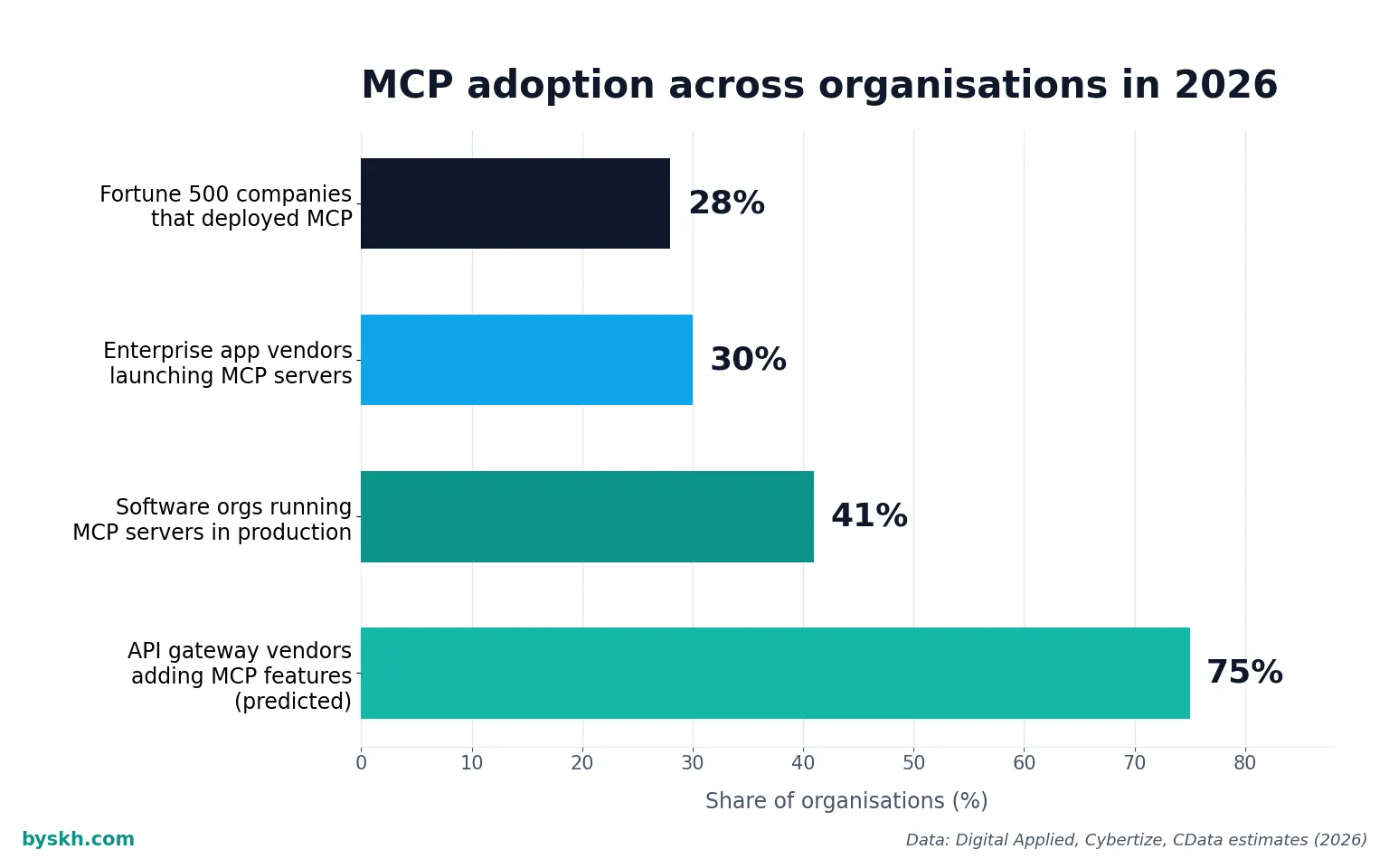
- MCP is a connector standard, not a product. It replaces one-off integrations with a single protocol any AI client can speak, which is why 41% of surveyed software organizations now run MCP servers in limited or broad production.
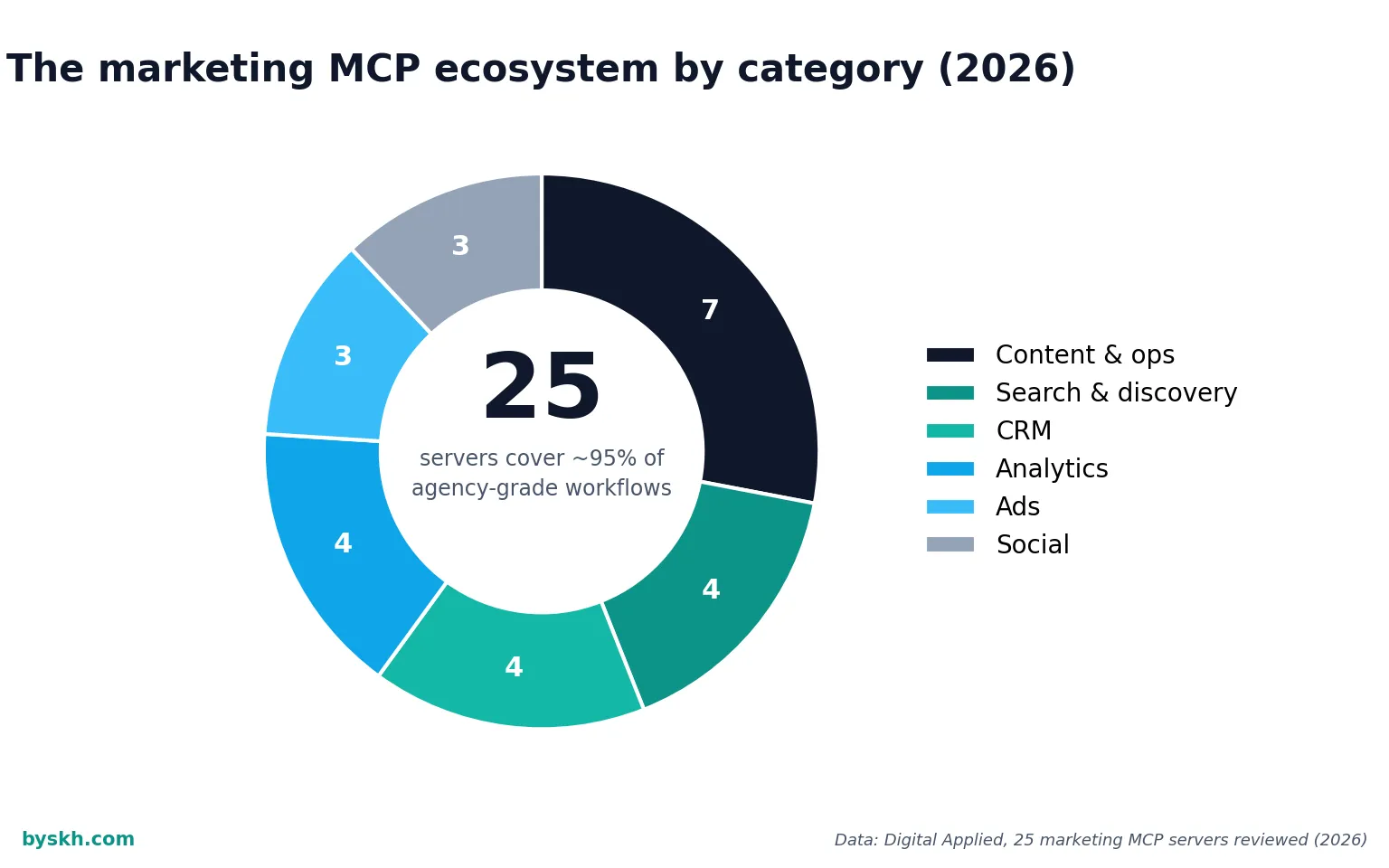
- The marketing ecosystem is already mature enough to use. One 2026 review found that 25 MCP servers cover roughly 95% of agency-grade marketing workflows across search, CRM, analytics, ads, social, and ops.
- The time savings are real but unevenly distributed. Knowledge workers on production AI agents recover a median 6.4 hours per week per seat, with senior practitioners closer to 10–12.
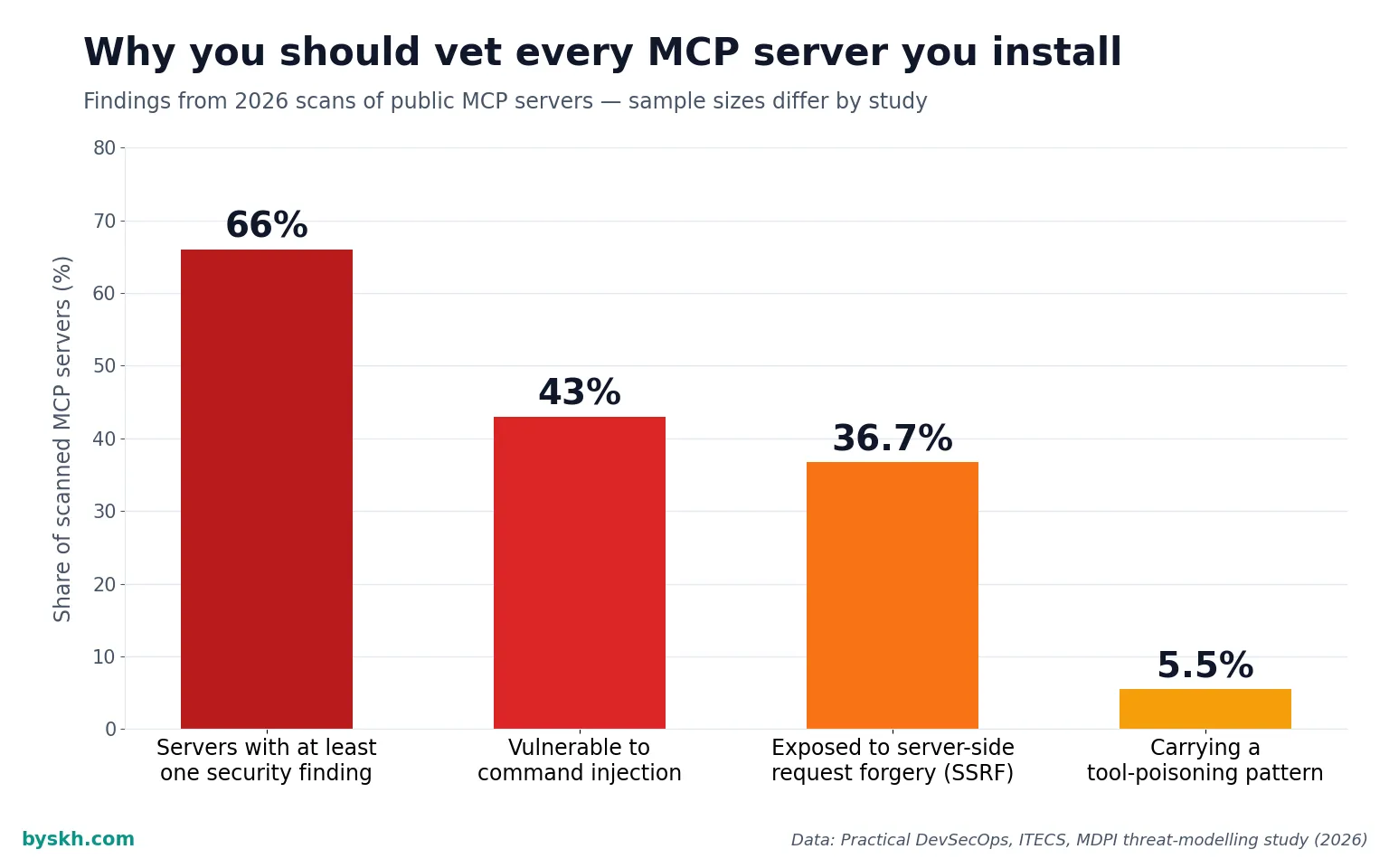
- Security is the part most guides skip. A 2026 scan found 43% of tested MCP servers vulnerable to command injection. Treat every server you install like an npm package with your API keys in its pocket.
- Start read-only. My rule: any server that can only read gets installed freely; anything that can write, spend, or publish earns its access one workflow at a time.
What Is MCP, in Plain Marketing English?
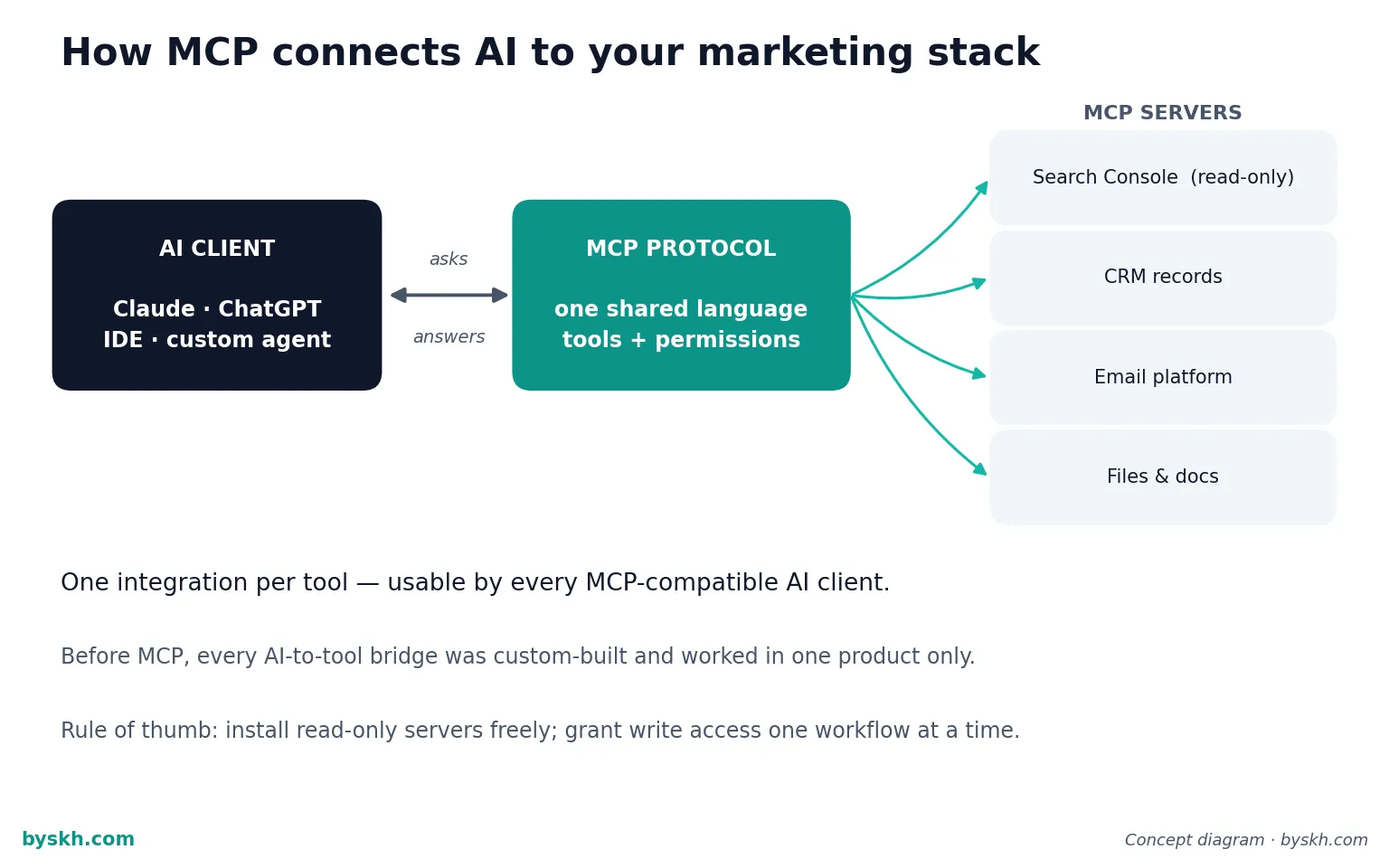
MCP is a standard way for an AI assistant to discover and call the tools you already pay for. Think of it as USB-C for AI: one plug shape, many devices.
Before it existed, every AI-to-tool connection was custom. If you wanted ChatGPT to read your Google Search Console data, someone had to build that specific bridge, and it worked in exactly one product.
With MCP, the tool vendor publishes one server and every compatible AI client can use it. That is why the ecosystem exploded so fast — the official registry counted 9,652 server records and nearly 29,000 server-version records by late May 2026.
The three pieces you actually need to know
The client is your AI app — Claude, ChatGPT, an IDE, or a custom agent. The server is a small program that exposes one tool’s capabilities. The protocol is the shared language between them.
You install servers; you do not build them. That distinction matters, because a lot of marketers read “protocol” and assume they need a developer. I set up my first six servers in an afternoon by editing a config file.
Momentum is coming from the vendor side too. CData estimates 30% of enterprise application vendors will ship MCP servers in 2026, with 75% of API gateway vendors adding MCP features.
Why I Switched My Whole Workflow to MCP
The honest reason is that my AI usage had hit a ceiling. I was writing excellent prompts against terrible context.
Ask any model to “analyse my email performance” and it will produce a beautifully structured answer full of invented numbers unless you feed it the real export. So I was spending twenty minutes gathering data to save ten minutes of writing.
MCP inverted that. Now the gathering is the free part.
The three workflows that changed most
Content gap analysis. I ask for pages where impressions are climbing but click-through is falling, and the assistant queries Search Console directly, then cross-references what I have already published. What used to be a spreadsheet afternoon is now a four-minute conversation.
Campaign retros. Instead of exporting CSVs from three platforms, I ask one question and get a reconciled answer. Agencies are heading the same way — one 2026 analysis argues MCP servers are quietly replacing manual campaign management, with agents orchestrating ads platforms and CRM through a single protocol and humans approving.
Briefing. My writing briefs now start from live keyword and competitor data rather than my memory of it. That single change did more for output quality than any prompt template I have ever written.
The measured returns line up with what I see. AI in marketing operations averages around $5.44 returned per $1 invested according to 2026 productivity data, with a median payback near seven months.
The MCP Servers I Actually Use
I run a deliberately small stack. Every server you add is another set of credentials, another attack surface, and another thing that can silently break.
Analytics and search
Search Console and analytics servers are the highest-value install for almost every marketer, and the demand data agrees — one ranked list puts Grafana, Lemlist, and Google Search Console at the top by trailing search demand. This is where AI stops hallucinating and starts reporting.
I keep these strictly read-only. There is no scenario where I want an agent writing to my analytics config.
CRM and email
Connecting your CRM is where the “AI as junior analyst” idea becomes real: segment questions, lifecycle gaps, and list hygiene all become conversational. If you are still choosing tools at that layer, my rundown of the best AI email marketing software covers what integrates cleanly.
Authentication has matured fast here. Of the 25 marketing servers in that 2026 review, a clear majority now ship native OAuth flows rather than asking you to paste a long-lived API key into a text file — 17 of 25, to be precise.
Files, docs, and the boring glue
Filesystem and document servers are unglamorous and probably my most-used category. Being able to say “compare this quarter’s brief folder against what we actually shipped” is worth more than any clever ads integration.
What I deliberately left out
I do not connect anything that spends money autonomously. Ads platforms stay read-only in my setup, and I approve every change by hand.
That is a judgment call, not a rule. But given that only 41% of agent rollouts cross positive ROI within twelve months and 19% never reach payback, I would rather be slow and solvent.
How to Set Up Your First MCP Server
Here is the exact sequence I use, and it takes under an hour for the first one.
Step one: pick a read-only tool you check weekly
Do not start with your CRM. Start with whatever dashboard you open every Monday out of habit — that is your highest-frequency, lowest-risk win.
Step two: install from an official source
Use the vendor’s own server or the official registry listing. Random GitHub forks are the single biggest risk vector in this ecosystem, and I will explain why in the security section below.
Step three: connect with the narrowest credentials possible
Create a dedicated API user or OAuth grant with read scope only. If the tool supports scoped tokens, scope them. If it does not, that tells you something about the tool.
Step four: test with questions you already know the answer to
This is the step everyone skips and it is the most important one. Ask five questions where you already know the correct number and check the assistant’s answers against reality.
I have caught date-range mismatches and timezone errors this way that would have quietly poisoned a month of reporting. Enterprises report 20–30% faster time-to-market on AI features with MCP, but only when the plumbing is verified.
Step five: write down the questions that worked
Keep a running file of prompts that produced good output. This is the same discipline I describe in my guide to prompt engineering for marketers — the value compounds only if you save what works.
The Security Reality Nobody Puts in the Headline
I want to be direct here, because most MCP content is breathless and this part deserves caution.
An MCP server runs with whatever access you gave it, and your AI assistant follows instructions it finds in tool descriptions. That combination creates a genuinely new class of attack.
Tool poisoning
A malicious server can hide instructions inside the help text describing its own tools — text your assistant reads and obeys, but you never see. The Cloud Security Alliance flagged this pattern in a 2026 research note on tool poisoning and IDE auto-execution.
What makes it worse than ordinary prompt injection is persistence. A poisoned description ships inside the package and fires on every invocation, in every session, until somebody notices.
Prevalence estimates vary by methodology but none of them are comforting: an academic study found tool poisoning in about 5.5% of 1,899 servers, while a broader scan of 1,808 servers reported that 66% had at least one security finding.
The wider vulnerability picture
Beyond poisoning, roughly 36.7% of more than 7,000 scanned servers were exposed to server-side request forgery in 2026 threat-modelling work. Multiple high-severity issues also hit mainstream developer tools between mid-2025 and mid-2026.
Microsoft’s security team frames the shift well in its analysis of what changes when AI tools move from reading to acting: read access leaks data, write access causes damage.
My five rules
Install only from official vendor sources or the official registry. Prefer OAuth over pasted API keys. Grant read scope by default and write scope never by default.
Review what a server can do before enabling it, not after. And keep a written list of every server you have installed, because the ones you forget about are the ones that hurt you.
Practical guidance on hardening is improving quickly — this breakdown of preventing injection and poisoning attacks is a reasonable starting checklist if you are rolling MCP out to a team.
Is MCP Worth It for a Small Team?
Yes, with a caveat: the payoff scales with how much data you already have scattered across tools.
If you run one channel and check one dashboard, MCP is a nice convenience. If you run five channels and your reporting lives in six places, it is transformative.
For very small operations the baseline numbers are still encouraging — AI admin tooling saves small business owners 3–7 hours per week on drafting, summarising, and scheduling alone, before any custom integration.
The enterprise proof points are stronger than I expected too. Raiffeisen Bank reported a 40% improvement in risk assessment after integrating MCP-connected AI into that workflow.
Marketers specifically are being told to pay attention now rather than later — this 2026 marketer-focused adoption briefing makes the case that the protocol layer is where competitive advantage moves next, and I think that is roughly right.
How I decide whether a server earns its place
Every ninety days I look at each server and ask one question: what did this let me do that I could not do before? If the answer is “nothing specific,” I remove it.
Two of my original eight servers did not survive that review. Neither was bad software; they just did not change any decision I made.
MCP vs. Traditional Automation: What Actually Differs
Zapier-style automation is deterministic: when X happens, do Y. MCP is interrogative: ask anything, and the model decides which tools to call.
They solve different problems and I use both. Scheduled, repeatable, high-volume tasks belong in traditional automation — if that is your gap, my comparison of workflow automation software is the better starting point.
Open-ended analysis belongs in MCP. The mistake I made early was trying to force one into the other’s job.
Ecosystem scale suggests the market agrees this is a durable layer rather than a fad: the main servers repository alone passed 86,000 stars and 10,700 forks by mid-2026, with nearly 16,000 public repositories carrying the mcp-server topic.
Summary
MCP solved the context problem that was capping the value of AI in my marketing work. Instead of pasting data into a chat window, the assistant reads live systems and reasons over real numbers.
Start with one read-only server for a tool you already check weekly, verify its answers against numbers you know, and only then expand. Keep write access rare and deliberate, install from official sources, and audit your server list on a schedule.
The productivity ceiling is genuinely higher than the pre-MCP workflow — a median 6.4 hours a week recovered is not a rounding error. But the security surface is real, and the teams that get burned will be the ones that installed twenty servers in a weekend without reading a single tool description.
Frequently Asked Questions
What does MCP stand for?
MCP stands for Model Context Protocol. It is an open standard that defines how AI applications connect to external tools and data sources, so one integration works across many AI clients instead of being locked to a single product.
Do I need to be a developer to use MCP as a marketer?
No. Installing an existing MCP server usually means adding a few lines to a configuration file or clicking through an OAuth connection in your AI client. Building a new server requires development skills, but almost no marketer needs to do that — the ecosystem already covers most mainstream marketing tools.
Is MCP safe to use with my company’s marketing data?
It can be, with discipline. Install only from official vendor sources, prefer OAuth over long-lived API keys, grant read-only scope unless a workflow genuinely requires writing, and review each server’s tools before enabling it. Given that a majority of scanned servers in 2026 showed at least one security finding, treat unofficial servers as untrusted code.
How is MCP different from a Zapier automation?
Zapier-style automation runs predefined, deterministic workflows triggered by events. MCP lets an AI model decide, in the moment, which tools to call to answer an open-ended question. Use traditional automation for repeatable tasks and MCP for analysis and exploration.
Which MCP server should a marketer install first?
Whichever read-only analytics or search tool you already check most often — typically Google Search Console or your web analytics platform. It gives you the fastest visible payoff, carries almost no risk because it cannot change anything, and teaches you how the protocol behaves before you connect anything sensitive.
Will MCP replace marketing automation platforms?
Not replace, but reshape. Campaign execution and scheduled sends still belong in dedicated platforms. What MCP changes is the analysis and orchestration layer above them, where an agent can query several systems at once and a human approves the resulting decisions.
Conclusion
The thing I keep coming back to is how ordinary this feels once it is working. There is no dramatic moment — just the steady absence of copy-pasting.
If you try one thing from this article, make it a single read-only server connected to the dashboard you check every Monday. Ask it five questions you already know the answers to, and see whether it earns your trust.
That small test tells you more than any adoption statistic I could quote. If you want the wider context on where this fits, my overview of the AI agent platforms I actually use covers the layer that sits on top of all this.